7.2.16 Auto Pitch Live
Real-time pitch correction for the singer’s headphones while recording, less than 3 ms late, tuned to the key it hears in the singing. The take is recorded dry.

Auto Pitch Live corrects the pitch of a voice while it is being sung, so the singer hears themselves in tune in their headphones. The corrected voice arrives less than 3 ms late, at any sample rate. It hears the key from the singing itself, so you can add it and sing without setting anything up.
It is made for recording. The take is recorded dry, exactly as it was sung, and plays back that way: Auto Pitch Live corrects only what the singer hears while the track monitors its input. To tune the take afterwards, use the pitch editing in the Audio Editor.
- Less than 3 msThe singer hears the corrected voice about as late as standing a metre from a speaker. The face shows the exact figure.
- Works on its ownOn Auto it hears the key from the singing and tunes to it. No key to type, no chords to write.
- Or follows your songChoose a key, the song’s key, the chord lane or a MIDI part as the notes to tune to.
- Natural by defaultA new note settles before it is pulled, vibrato is kept, and breaths and “s” sounds pass untouched.
- Hard tune when you want itTurn Speed right down, or load the Hard preset, for the classic effect.
- See what it doesThe note being sung, how far off it is, how far it is moved, and how sure Auto Pitch is.
- Note by noteTune to a note, skip it, or pass it exactly as sung.
- The take stays as sungNothing is decided for you: the recording is always dry.
7.2.16.1 Adding Auto Pitch Live
- Open the mixer and click an empty insert slot on your vocal track.
- Choose Auto Pitch Live. Its window opens.
- Switch on the track’s input monitoring and arm it, then sing.
The mode in the title bar reads MONITORING while the track monitors its input: this is when Auto Pitch Live corrects. On playback it reads PLAYBACK and the take plays dry.
7.2.16.2 Quick start
- Leave TARGET on Auto and sing. While it learns, the key reads listening and Auto Pitch Live tunes to the nearest note.
- Once it is sure of the key, KEY · HEARD shows it with how sure it is, and the note buttons light the notes it tunes to.
- For a more natural sound, raise SPEED. For the hard-tuned effect, turn it right down.
- Press △ in the title bar to hear only what Auto Pitch Live changes, then press it again.
7.2.16.3 The title bar

- Power: switches Auto Pitch Live on and off. The delay it reports stays the same either way, so switching it never moves your track in time.
- Track and slot: where Auto Pitch Live is, for example VOCAL · INS 1.
- Mode and delay: MONITORING while the track monitors its input, PLAYBACK otherwise, or BYPASSED, with the delay in milliseconds.
- Presets: the preset name, with arrows to step through them. Click the name for the preset menu.
- A/B: compare two settings.
- Compare (the two rings): hear the voice without Auto Pitch Live, in time with the corrected one.
- △ (Delta): hear only what Auto Pitch Live changes.
7.2.16.4 Now: the note being sung
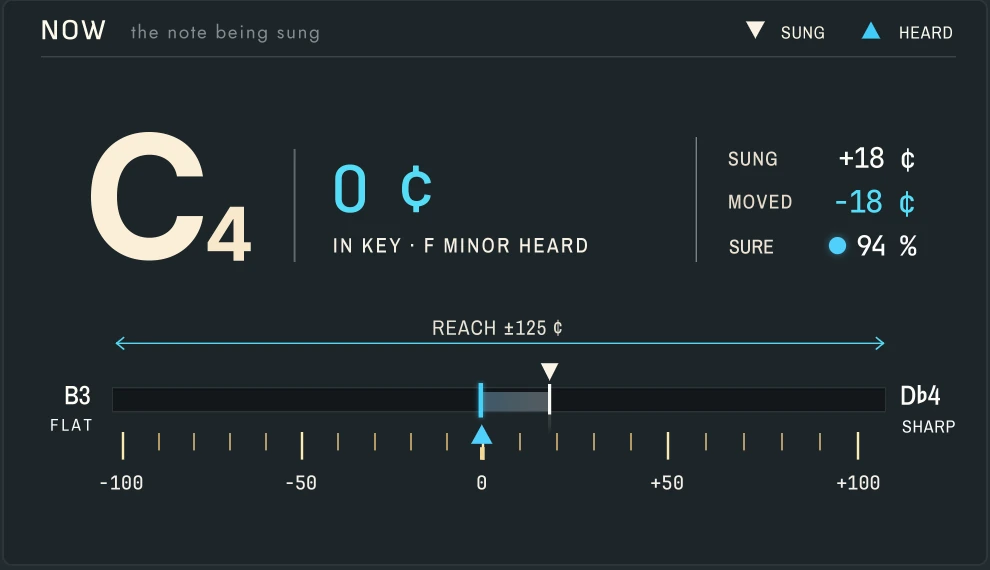
- The note: the note the voice is tuned to now, with its octave, and how far the voice the singer hears is from it, in cents.
- The line under it says why: for example IN KEY · F MINOR HEARD, LISTENING · NEAREST NOTE, PAST REACH · LEFT AS SUNG, or a note you set to pass.
- SUNG: how far off the sung note is, in cents. MOVED: how far Auto Pitch Live moves it. SURE: how sure it is of the pitch.
- The cents bar runs from 100 cents flat to 100 cents sharp, between the notes either side. ▼ marks the pitch as sung and ▲ the pitch heard. The arrow above it shows REACH.
7.2.16.5 Correction
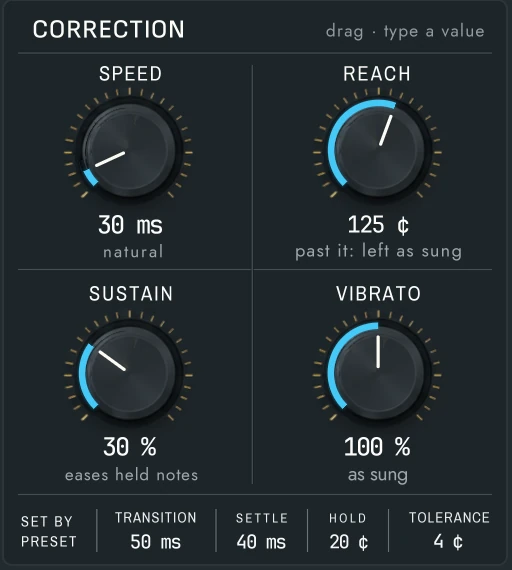
| Control | Range | What it does |
|---|---|---|
| SPEED | 0 – 400 ms | How fast a note is pulled to its target. At the bottom it snaps at once (the hard-tuned sound); higher is gentler. The word under it says how it sounds: hard tune, tight, natural or gentle. |
| REACH | 10 – 200 ¢, Off | Notes sung further off than this are left as sung, so deliberate scoops and slides pass. Off: every note is pulled. |
| SUSTAIN | 0 – 100 % | Eases the correction on long held notes, for a more human sound. |
| VIBRATO | 0 – 200 % | How much of the singer’s vibrato rides on the corrected note: 100 % keeps it as sung, 0 % flattens it, above 100 % deepens it. |
Under the knobs, four values come from the preset:
- TRANSITION: how fast the pitch moves from one note to the next when the singer changes note.
- SETTLE: how long a new note must hold before it is moved, so passing notes and the start of a slide are not pulled.
- HOLD: how far past the halfway point a note must go before Auto Pitch Live switches to the next target, so a wobble between two notes doesn’t flip back and forth.
- TOLERANCE: notes already this close to the target are left alone.
7.2.16.6 Target, key and voice

TARGET decides which notes a sung note may be moved to:
- Auto (the default): the key heard in the singing. Until it is sure, the nearest note.
- Key: a key you choose, or the song’s key. Nine scales: major, minor, harmonic minor, melodic minor, Dorian, Phrygian, Lydian, Mixolydian and Locrian.
- Chord lane: the chords on the chord lane, chord by chord.
- MIDI part: the notes of a MIDI part you choose, for example a written melody.
- Chromatic: every semitone.
- Custom: only the notes you choose.
On Auto, KEY · HEARD shows the key heard and how sure Auto Pitch Live is of it. Click the padlock (Hold key) to keep that key, so it no longer changes; click ↻ (Relearn) to forget it and listen again.
VOICE tells Auto Pitch Live where the voice sits: Auto finds it by itself, or choose High, Mid, Low or Bass.
The note buttons show the notes in use. Click a note to change it: target (a note it tunes to) → skip (never tuned to) → pass (left exactly as sung, for a blue note). NOTES counts them. With Chord lane or MIDI part as the target, the chord or the part decides, and the buttons rest.
7.2.16.7 Singer hears, formant and tuning

- SINGER HEARS: CORRECTED, or DRY for the voice as sung. The take is recorded dry either way.
- FORMANT KEEP (on by default): the character of the voice stays where it is when a note moves, so the singer still sounds like themselves.
- TRACKING: how sure Auto Pitch Live must be of the pitch before it corrects. Higher corrects only the clearest singing; lower corrects more of it.
- TRANSPOSE: move the whole voice up or down, up to 12 semitones.
- A4: the tuning reference, from 415 to 466 Hz, for a song or a band not tuned to 440 Hz.
- MIX: how much of the corrected voice is heard.
- SINGER HEARS IT … LATE: the delay the singer hears, in milliseconds and samples. Nothing else is added on the way.

7.2.16.8 What it leaves alone
- Breaths and “s” sounds pass untouched, so they never sound processed.
- A voice crack: a sudden octave jump is held, so it never sends the correction an octave away.
- The stereo image: both sides of a stereo vocal are corrected together.
- Silence and unsung moments: the voice passes exactly as it came in.
7.2.16.9 Presets
Eight factory presets in four folders: Basics (Default, Natural, Gentle, Tight), Hard Tune (Hard, Classic robot), Styles (Rap) and Live (Live-safe). A preset keeps how Auto Pitch Live corrects; it never changes which notes it tunes to, the A4 reference or what the singer hears. Save your own from the preset menu.
7.2.16.10 Recipes
A singer who wants to feel in tune: Auto, the Natural preset, Vibrato 100 %. Let them sing a verse before the real take, so the key is heard.
The hard-tuned effect: Key set to the song, the Hard preset, Reach Off.
A tricky melody: MIDI part, with the written melody as the part, so every note goes exactly where it should.
A blue note: click that note until it reads pass. It stays exactly as sung.
The singer prefers their own voice: SINGER HEARS on DRY. Nothing changes in the recording.
Didn’t find what you need? Contact us.