7.2.8 Enhancer
A three-band stereo widener: set the width of the lows, the mids and the highs on their own, with a mix that always stays safe in mono.

Enhancer makes a stereo sound wider or narrower, in three bands. Keep the bass tight in the centre, open up the mids, and spread the highs out to the sides, all at once.
Each band has its own width, from mono to twice as wide, and you choose where the bands meet by dragging the two dividers on the display. Enhancer never changes what your mix sounds like in mono, so you can widen as much as you like without the sound falling apart on a phone or a club system. It adds no latency, every change is smooth, and a correlation meter shows how wide the result really is.
- Three bandsLow, mid and high, each with its own width from 0 % (mono) to 200 %.
- Mono-safeHowever wide you go, the mono version of your sound stays exactly the same.
- Movable crossoversDrag the dividers on the display, or turn the knobs, to choose where each band starts.
- Master widthOne knob makes all three bands wider or narrower together.
- SoloListen to one band on its own while you set it.
- Correlation meterSee at a glance how wide the sound is, and when it is getting out of phase.
- Clean mixBlend the wide sound with the original with no phasey side effects.
- PresetsSix factory presets, plus your own, with A/B to compare.
7.2.8.1 Adding Enhancer
- Open the mixer and click an empty insert slot on a stereo track, a bus or the master.
- Choose Enhancer. Its window opens.
- Press play and move the band faders.
Enhancer starts on Init: every width at 100 %, which leaves the sound as it is. It works on stereo sound. A mono track has no width to change, so put Enhancer after something that makes the sound stereo, or on a bus.
7.2.8.2 Quick start
- Lower the LOW fader to 0–50 % to keep the bass in the centre.
- Raise HIGH to 130–170 % for a wide, open top.
- Set MID to taste, usually 100–120 %.
- Watch the correlation meter: keep it above 0 most of the time.
- Press BYPASS to compare with the original.
7.2.8.3 The title bar

- ◀ ▶: step to the previous or next preset.
- The preset name: click it for the list of presets. When your settings don’t match any preset, it reads Custom.
- SAVE: save the current settings as a preset of your own, under a name you choose. Your presets appear in the list next to the factory ones.
- A / B: compare two settings. Press it to keep the current setting, make changes, then press it again to swap between the two.
- BYPASS: switch Enhancer off and on, to hear the original.
- ✕: close the window. Enhancer keeps working.
Factory presets
| Preset | What it does |
|---|---|
| Init | Every width at 100 %: no change. The starting point. |
| Wide Mix | A little narrower in the lows, wider mids and highs, for a full mix or a bus. |
| Air Up Top | Only the very top gets wider, from 6 kHz up. |
| Mono Bass | The lows in mono, slightly wider mids and highs. |
| Big & Wide | A big, spread-out sound with a centred low end. |
| Narrow | Brings the mids and highs closer to the centre. |
7.2.8.4 The bands
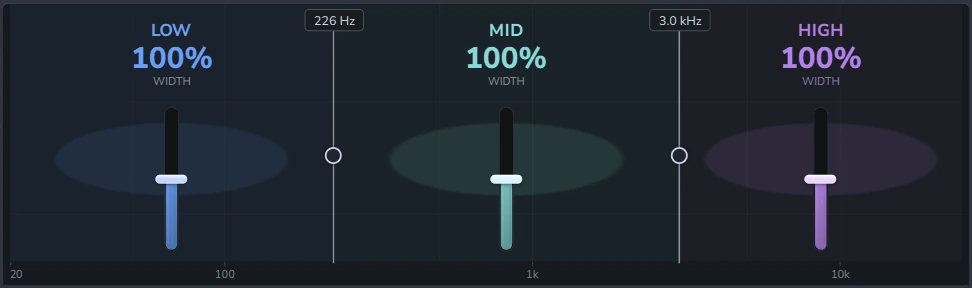
The display runs from 20 Hz on the left to 20 kHz on the right. It is split into three bands, each with:
- The width in large numbers.
- A fader to set it: 0 % is mono, 100 % leaves the band as it is, 200 % is twice as wide.
- An image behind the fader that grows wider and narrower with the band, so you can see the stereo picture.
The two vertical lines are the crossovers, where one band ends and the next begins. Drag a line left or right to move it; its tag shows the frequency. The low divider (LOW | MID) goes from 50 Hz to 1 kHz, the high one (MID | HIGH) from 1 kHz to 12 kHz, and the low one always stays below the high one. The bands always add up to the full sound: moving a crossover changes which frequencies each width applies to, never the tone.
7.2.8.5 The controls

| Control | Range | What it does |
|---|---|---|
| MASTER WIDTH | 0 to 200 % | Makes all three bands wider or narrower together. At 100 % the bands are as you set them; at 50 % each band is half as wide; at 0 % everything is mono. |
| LOW | MID | 50 Hz to 1 kHz | Where the low band ends and the mid band begins. The same as dragging the left divider. |
| MID | HIGH | 1 to 12 kHz | Where the mid band ends and the high band begins. |
| SOLO | OFF · LOW · MID · HIGH | Hear one band on its own. Switching fades smoothly, with no click. Set it back to OFF when you are done. |
| MIX | 0 to 100 % | The balance between the original (0 %) and the processed sound (100 %). The blend stays clean, with no phasey sound. |
The correlation meter
The meter under SOLO shows how alike the left and right sides of the output are, from −1 to +1:
- +1: both sides are the same, which is mono.
- Between 0 and +1: a healthy stereo sound. Most mixes sit here.
- Below 0: the sides are working against each other. Parts of the sound may be weak on some speakers. Lower the width of the band that pushed it there.
The meter reads 0 while no sound is playing.
7.2.8.6 Why it stays mono-safe
Enhancer changes only the difference between the left and right sides. The part both sides share, which is what you hear when the mix is played in mono, is never touched. So a wide guitar or a wide pad keeps its level and its tone on a phone speaker, on a mono club system or on the radio.
7.2.8.7 Controls and gestures
| Do this | To |
|---|---|
| Drag a fader or a knob up or down | Change it. Hold Ctrl or Shift for fine steps. |
| Click a fader’s track | Jump the fader there. |
| Drag a divider left or right | Move a crossover. |
| Mouse wheel over a fader, a knob or a divider | Change it in small steps. Hold Ctrl or Shift for finer ones. |
| Double-click a fader, a knob or a divider | Reset it (widths to 100 %, crossovers to 250 Hz and 3 kHz). |
| Right-click a fader, a knob or a divider | Reset, type a value, and create, edit or clear its automation. |
The widths, the crossovers, MASTER and MIX can be automated. SOLO is for listening while you set things up, so it is not part of the automation.
7.2.8.8 Good to know
- No latency. Enhancer adds no delay, so you can use it while recording.
- Smooth changes. Widths, crossovers and solo all glide, so moving them while the song plays never clicks.
- Stereo in. A mono sound has no width to change; at any setting it comes out the same.
7.2.8.9 Recipes
Tight low end
LOW 0 %, LOW | MID around 150–200 Hz. The bass and kick stay in the centre where they hit hardest.
Wider mix bus
Start from Wide Mix, then lower MASTER until the change is just noticeable with BYPASS.
Airy vocals or cymbals
Start from Air Up Top: only the highs above 6 kHz get wider, so the body stays focused.
Pull a busy part back
Use Narrow, or lower MID, to move a part closer to the centre and make room for the lead.
7.2.8.10 Troubleshooting
Nothing changes. Check that the track is stereo, BYPASS is off and MIX is above 0 %. With every width at 100 % (Init), Enhancer leaves the sound as it is.
Only one band plays. SOLO is on. Set it to OFF.
The correlation meter goes below 0. The sound is very wide. Lower the width of the band that sounds hollow, or lower MASTER.
Didn’t find what you need? Contact us.