7.2.4 Harmonic Space
A studio reverb with six spaces, shimmer, ducking, freeze and a live response display. Rooms, halls, plates and endless ambient washes.

Harmonic Space is the flagship reverb of Harmonic Pro Studio: one plugin that covers everything from a subtle room behind a drum kit to a vast, shimmering cathedral under a film score. It gives you the depth of a studio reverb, the creative tools of a sound-design unit and a clear picture of exactly what it is doing.
Six hand-voiced spaces, each built separately rather than one space with different settings, sit alongside tempo-synced pre-delay, eight kinds of tail movement, pitch-shifting shimmer, ducking, gate and reverse envelopes and a true freeze. Every control can be moved while the song plays, without clicks, and the reverb stays stable however far you push it.
- Six distinct spacesRoom, Hall, Cathedral, Plate, Chamber and Concert, each with its own character, early reflections and density.
- Decay and size, separatelySet how long the reverb lasts and how big the space is on their own, from 0.1 to 20 seconds, so a long tail can live in a small room or a short one in a huge hall.
- Live response displaySee the pre-delay, the early reflections and the tail you asked for, next to how the reverb really fades.
- Eight kinds of movementFrom completely still to chorus, ensemble, tape-style drift and two vintage digital characters. Random keeps held notes perfectly in tune.
- Two-voice shimmerTails that climb or fall in pitch as they fade, in octaves, fifths or any interval, following the song’s key or chords if you like.
- DuckingThe reverb holds back while the sound plays and blooms in the gaps, driven by the track itself or by another track.
- Gate and reverseThe classic gated snare and the reverse swell, on any of the six spaces.
- FreezeCatch the reverb and hold it for as long as you want, for pads, transitions and ambient beds.
- Room-like tone shapingLow and high damping that work inside the reverb as it fades, bass decay that rings longer or shorter than the mids, and Bass Lock to keep the low end steady under deep movement.
- Tempo-synced pre-delayLock the gap before the reverb to note values from 1/32 to 1/4, so it sits in time at any tempo.
- Presets and compareThirteen factory presets in folders, your own presets with search, and A/B to compare two settings.
- Built for real sessionsNo added latency, true stereo, click-free changes, full automation and a reverb that never runs away.
7.2.4.1 Adding Harmonic Space
- Open the mixer and click an empty insert slot on the track.
- Choose Harmonic Space (under Reverb). Its window opens.
- Click a preset in the left column, or follow the Quick start.
To open the window again later, click the effect in its insert slot, or right-click it and choose Edit…. The window floats, so you can keep working in the rest of the program while it is open.
7.2.4.2 Quick start
- Choose an ALGORITHM: ROOM for a small space, HALL for a vocal, PLATE for snare or vocal, CATHEDRAL for something huge. Choosing one also sets SIZE and DIFFUSION to suit it.
- Set DECAY: about 0.5–1 s for a room, 1.5–2.5 s for a hall, 4 s and up for big ambient spaces.
- Raise MIX (bottom right) to 25–40 %. If the track feeds a reverb-only track, use 100 %.
- Add 10–30 ms of PRE-DELAY to keep the sound clear in front of the reverb.
- If the reverb muddies the mix, raise LOW CUT to 150–300 Hz.
7.2.4.3 The window
A title bar across the top, then three columns:
- Left: ALGORITHM, MOVEMENT (with RATE, DEPTH and DRIVE) and the PRESETS browser.
- Centre: the RESPONSE display, SPACE & TIME, then SHIMMER, DYNAMICS - DUCK and TONE & DAMPING.
- Right: the MIX BUS meters and OUTPUT (MIX and TILT).
The title bar

- + saves the current settings as a new preset (see Presets).
- Preset name: the folder and name of the preset your settings match, for example Utility / Tempo Slap Room. It reads Default for the starting settings, and Custom as soon as your settings no longer match a preset.
- ◁ ▷ load the previous or next preset in the same folder.
- FREEZE holds the reverb (see Freeze). It lights up while on.
- A / B switches between two sets of settings so you can compare them. The lit letter is the one you are hearing.
- BYPASS switches the effect off so you hear the track without it. It lights up while bypassed. A small A next to it means Bypass has an automation lane; while that lane is playing back, Bypass follows it, and clicking shows a reminder instead of switching.
- ✕ closes the window. The reverb keeps working.
Drag an empty part of the title bar to move the window.
7.2.4.4 The Response display
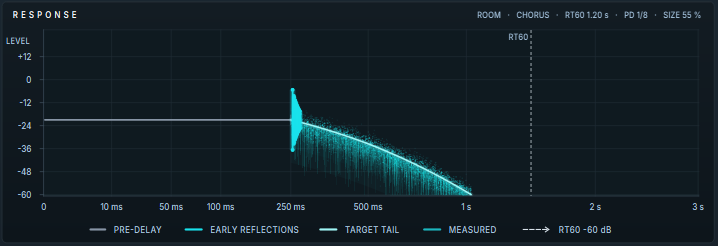
A picture of your reverb over time, from the moment a sound arrives (left) to 3 seconds later (right). The first 100 ms are spread out so you can see the start clearly. The line at the top right sums up the settings: algorithm, movement, decay time, pre-delay and size.
- PRE-DELAY (grey line): the gap before the reverb starts.
- EARLY REFLECTIONS (bright bars): the first separate echoes off the walls. Their pattern comes from the algorithm, their spacing from SIZE and their height from REFLECTIONS.
- TARGET TAIL (pale curve): how the reverb should build up and fade, from ATTACK and DECAY.
- MEASURED (teal line): how the reverb is actually fading, measured from the sound. It appears after you play something and let it stop.
- RT60 (dashed line): the point where the tail has faded by 60 dB, which is what the DECAY time means.
7.2.4.5 Algorithm and Movement
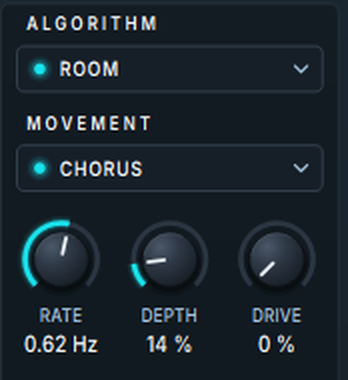
Algorithm
The kind of space. Click the field to choose, or turn the mouse wheel over it. Each one also sets SIZE and DIFFUSION to a good starting point, which you can then change.
| Algorithm | Character | Sets SIZE / DIFFUSION |
|---|---|---|
| ROOM | A small, natural room. Depth without an obvious “reverb” sound. Drums, guitars, dialogue. | 50 % / 52 % |
| HALL | A classic concert hall. The all-round choice for vocals, strings and piano. | 75 % / 65 % |
| CATHEDRAL | The biggest space: vast, dense and slow to bloom. Pads, choirs, cinematic sounds. | 100 % / 76 % |
| PLATE | A bright, dense plate that stays compact whatever the decay. Snare, vocals. | 40 % / 82 % |
| CHAMBER | A hard, bright room built for reverb, dense from the first moment. Vocals, drums, guitars. | 60 % / 85 % |
| CONCERT | A large hall with distinct early echoes at the start and a very smooth, dense end. | 85 % / 70 % |
You can change the algorithm while the track plays, without a click. ROOM, HALL, CATHEDRAL, CHAMBER and CONCERT crossfade smoothly into one another; switching to or from PLATE lets the old reverb ring out while the new one starts. Every algorithm plays at the same level, so a change alters the character, not the loudness. The algorithm can’t be changed while FREEZE is on; the change happens when you turn Freeze off.
Movement
Gentle motion inside the reverb keeps the tail from sounding static or metallic. Each mode is a different kind of motion:
| Movement | What it does |
|---|---|
| CLEAN | No modulation: the stillest, most precise tail. RATE and DEPTH have no effect. |
| CHORUS | Smooth, wide movement that thickens the tail. Lovely on pads. |
| LUSH | The same kind of movement, gentler. Warmth without drawing attention. |
| RANDOM | Wanders instead of cycling, so held notes, strings and vocals stay steady in pitch. The best choice for sustained, pitched sounds. |
| CHAOTIC | Tape-style wow and flutter: irregular drift with a little grit. |
| ENSEMBLE | Several movements at once, for a thick, choral tail. |
| VINTAGE 80S | The shimmering, slightly grainy sound of early digital studio reverbs. |
| VINTAGE 70S | Darker and grittier, like the first digital reverbs. It also limits HI CUT to 10 kHz. |
| Control | Range | What it does |
|---|---|---|
| RATE | 0.05 to 5 Hz | The speed of the movement. |
| DEPTH | 0 to 100 % | The amount of movement. |
| DRIVE | 0 to 100 % | Warm saturation inside the reverb. A little adds density and glues the tail; a lot is an effect in itself. It can never make the reverb run away. |
7.2.4.6 Space and Time

| Control | Range | What it does |
|---|---|---|
| PRE-DELAY | 0 to 200 ms, or a note length | A gap between the sound and the start of the reverb. 10–40 ms keeps a vocal or drum clear and upfront. Moving it while the song plays never bends the pitch. |
| ATTACK | 0 to 200 ms | How gradually the reverb builds up. At 0 it arrives with the sound; higher values let it bloom in behind, which makes a space feel bigger rather than just longer. |
| DECAY | 0.10 to 20 s | How long the reverb takes to fade by 60 dB. It means the same on every algorithm. |
| SIZE | 0 to 100 % | How big the space is: the spacing and density of the echoes. It doesn’t change the decay time. DECAY sets how long, SIZE sets how big. |
| REFLECTIONS | 0 to 100 % | The level of the early reflections. They tell your ear how big the room is and how far away the sound is. Up brings the room forward; down leaves a smooth wash. |
| DIFFUSION | 0 to 100 % | How much the echoes are blended together. Low leaves separate, grainy echoes; high gives a smooth wash. |
Pre-delay in time with the song
The small MS | 1/8 switch under PRE-DELAY locks the pre-delay to the song tempo:
- Click the note cell to switch to note lengths. Click it again to step through 1/32, 1/16T, 1/16, 1/8T, 1/8 and 1/4.
- The value under the knob shows the real time in ms, which can be more than 200 ms at slow tempos.
- Click MS, or touch the PRE-DELAY knob, to go back to milliseconds.
7.2.4.7 Shimmer
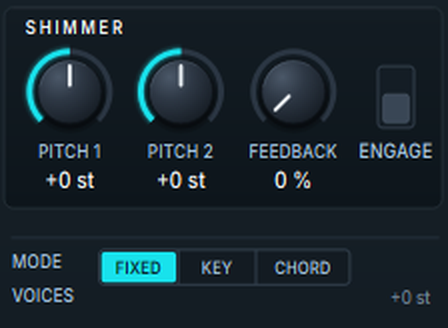
Shimmer shifts the pitch of the tail and feeds it back into the reverb. Each time around it is shifted again, so the tail climbs (or falls) into a glowing cloud of harmonics: the classic ambient and cinematic sound.
| Control | Range | What it does |
|---|---|---|
| ENGAGE | On / off | Switches Shimmer on. |
| PITCH 1 | −24 to +24 semitones | The pitch shift. +12 (an octave up) is the classic shimmer; +7 adds a fifth; negative values give dark drones. |
| PITCH 2 | −24 to +24 semitones | A second voice. Leave it at 0 for one voice; for example +12 and +7 together sound like a chord. Not used by the PLATE algorithm. |
| FEEDBACK | 0 to 100 % | How much of the shifted tail goes back in: how strongly the shimmer builds. It is limited inside, so it never runs away, even at 100 %. |
- MODE: FIXED uses the pitches exactly as set. KEY moves them to the nearest notes of the song’s key. CHORD moves them to notes of the current chord on the chord track, so the shimmer stays in tune as the harmony changes. KEY and CHORD choose the shift only; they don’t retune your notes.
- VOICES shows the pitch shifts in use, for example +12 · +7 st.
7.2.4.8 Dynamics - Duck
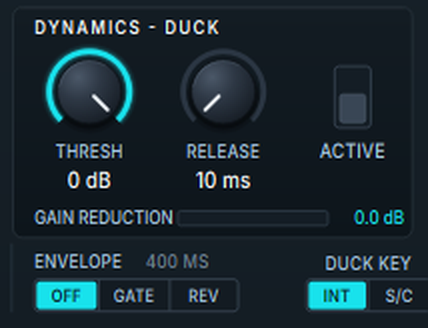
Ducking holds the reverb back while the sound is loud and lets it fill the gaps. While the track is above the threshold, the reverb is turned down; when it falls quiet, the reverb blooms. The reverb still hears everything you play, so its tail is already full when the gap comes. You can use a bigger reverb than usual and still keep a vocal clear.
| Control | Range | What it does |
|---|---|---|
| ACTIVE | On / off | Switches ducking on. |
| THRESH | −60 to 0 dB | The level above which ducking starts. Around −24 dB is a good start for vocals. |
| RELEASE | 10 to 2000 ms | How quickly the reverb comes back once the sound drops below the threshold. |
GAIN REDUCTION shows how much ducking is happening right now.
Envelope: gate and reverse
ENVELOPE shapes the whole reverb each time a sound starts:
- OFF: a normal reverb.
- GATE: the reverb stays open for the envelope time, then cuts off. The big gated snare of the 1980s.
- REV: the reverb swells up from silence over the envelope time, then cuts off. A reverse-reverb swell into the next phrase.
The time next to ENVELOPE (20 to 2000 ms, starting at 400 ms) sets the gate length or the swell. Drag it up or down to change it, or click it to type a value.
Duck key
DUCK KEY chooses what drives the ducking and the envelope: INT listens to this track; S/C listens to the track set as this effect’s sidechain, for example to duck a guitar’s reverb whenever the vocal sings. With no sidechain set, S/C works like INT.
7.2.4.9 Tone and Damping
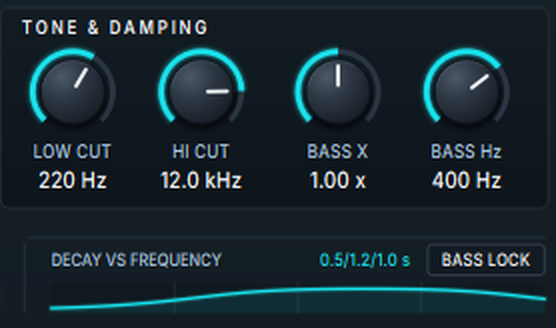
These controls work inside the reverb, so they shape the tail more and more as it fades, the way a real room does.
| Control | Range | What it does |
|---|---|---|
| LOW CUT | 20 to 1000 Hz | Makes the lows below this frequency fade away quickly. 150–300 Hz is the quickest way to stop a reverb muddying the mix. |
| HI CUT | 1 to 20 kHz | Makes the highs above this frequency fade faster, like air in a real space. Lower it to push the reverb back and make it darker. |
| BASS X | 0.25 to 4.00 × | How long the lows ring compared with the rest. At 2.00 × they last twice as long, like a stone hall; at 0.50 × they die away first, like a dry, controlled room. 1.00 × is neutral. |
| BASS Hz | 50 to 1000 Hz | Where “bass” ends for BASS X and BASS LOCK. |
- DECAY VS FREQUENCY shows the decay time at 100 Hz, 1 kHz and 8 kHz (for example 0.5/1.2/1.0 s), with a curve across the whole range. It is worked out from DECAY and the four tone controls.
- BASS LOCK keeps the movement out of the low end, so the bass stays steady even with a deep DEPTH. It works when MOVEMENT isn’t CLEAN, and not on the PLATE algorithm. Turn it on whenever you use a lot of DEPTH.
7.2.4.10 Freeze
FREEZE in the title bar catches the reverb that is sounding and holds it. New sound stops going in, and the held reverb carries on for as long as Freeze is on, with its full tone, low end included. Shimmer stops adding to a frozen reverb, so it holds at the level it had. Turn it off to let it fade normally. Use it for pads, transitions and ambient beds, or automate it to freeze the reverb on the last chord of a section.
7.2.4.11 Mix Bus and Output
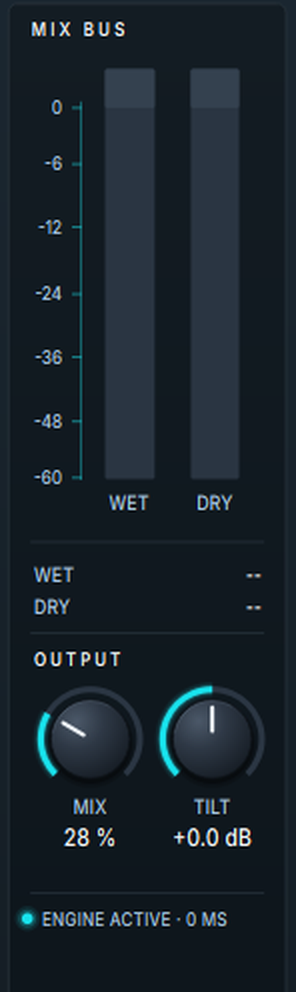
- MIX BUS: WET is the level of the reverb, DRY the level of the sound coming in. The numbers below show them in dB, or “--” while there is no sound.
- MIX (0 to 100 %): the balance between the original sound and the reverb. 20–50 % on a track; 100 % on a track used only for reverb. At 100 %, with SIZE 50 % and DECAY 2 s, a steady sound comes back at about the level it went in, whichever algorithm you choose. Longer decays and smaller sizes build up louder; shorter decays come back quieter.
- TILT (−12 to +12 dB): changes the tone of the reverb without changing its decay. Positive values make it warmer (more low end, less top); negative values make it brighter. Use it when the length is right but the colour isn’t.
7.2.4.12 Presets
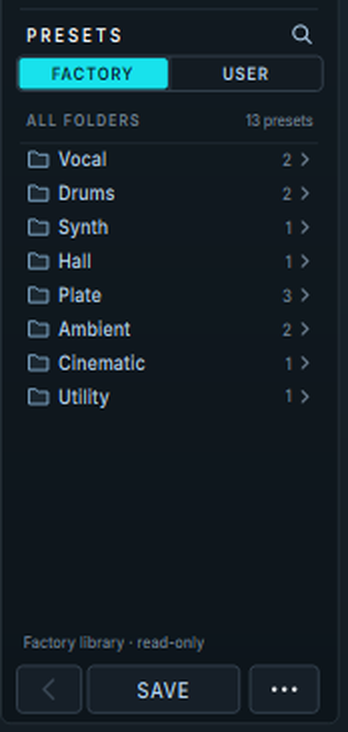
- Load: click a folder to open it, then click a preset. The preset that matches your settings is highlighted.
- FACTORY | USER: the presets that come with Harmonic Space (they can’t be changed), and your own.
- Search: click the magnifier and type. It searches both tabs by preset and folder name.
- < goes back up a folder, or out of the search.
- SAVE: if your current preset is one of yours, SAVE updates it straight away. Otherwise it asks for a name and saves a new preset in your user presets.
- … menu: Save As, Rename, Delete, Move to Folder, New Folder, the location of your presets folder, Show Presets Folder and Refresh List.
- Right-click a preset for Load, Duplicate, Rename, Move, Delete or, on a factory preset, Save a Copy to User. Right-click a user folder to rename or delete it, or to save the current settings into it.
Your presets are saved in your user folder, which you set in Settings › Locations. Each preset is a file ending in .hsprst, so you can copy them to another computer.
Factory presets
| Folder | Preset | What it is |
|---|---|---|
| Vocal | Lead Vocal — Hall | A classic vocal hall with a little pre-delay and the lows trimmed. |
| Vocal | Reverse Swell Vocal | The reverb swells up into each phrase. |
| Drums | Drum Room Glue | A short, tight room that brings a kit together. |
| Drums | Gated Snare | The 1980s gated snare. |
| Synth | Ducked Lead Synth | A big space that only blooms in the gaps. |
| Hall | Bass-Locked Big Hall | A rich, moving hall with a steady low end and long-ringing bass. |
| Plate | Plate 1979 | A classic bright plate with a touch of grit. |
| Plate | Snare Plate — short | A tight, bright plate for snare and claps. |
| Plate | Plate Vocal — wide | A smooth vocal plate that never clouds the low mids. |
| Ambient | Ambient Shimmer Wash | A shimmering wash in two voices. Use it at 100 % on a reverb track. |
| Ambient | Ensemble Cathedral | A thick, choral cathedral with shimmer an octave up. |
| Cinematic | Dark Cinematic Drone | Downward shimmer, drive and long low end. Use it at 100 % on a reverb track. |
| Utility | Tempo Slap Room | A room whose pre-delay is locked to 1/8, so it lands in time at any tempo. |
7.2.4.13 Knobs and gestures
| Do this | To |
|---|---|
| Drag a knob up or down | Change it. Hold Shift or Ctrl for fine steps. |
| Mouse wheel over a knob | Change it in small steps (the pitch knobs move a semitone at a time). |
| Double-click a knob | Reset it. |
| Click the value under a knob | Type a value. Units are understood: 3k, 250 ms, 1.2 s, -6 dB, +7 st. Enter to set, Esc to cancel. |
| Right-click a knob or switch | Reset to default, create, edit or clear its automation, type in, copy or paste the value. |
| Click a switch or button | Change it. ENGAGE, ACTIVE and BASS LOCK light up when on. |
See the Automation editor for working with automation lanes.
7.2.4.14 Good to know
- No delay. Harmonic Space adds no latency to your track.
- True stereo. Left and right stay separate through the reverb, so a sound panned to one side is heard on that side in the reverb too. PLATE, like a real plate, blends them.
- Smooth changes. Every control can be moved while the track plays, without clicks or pitch jumps.
- Always stable. Long decays, heavy Drive and full Shimmer feedback can’t make the reverb run away.
- Insert or reverb track. On a single track, use MIX at 20–50 %. To share one reverb between many tracks, put it on its own track at MIX 100 % and send the tracks to it.
7.2.4.15 Recipes
Clear lead vocal
HALL, DECAY 1.6–2.2 s, PRE-DELAY 20–40 ms (or 1/16), LOW CUT 200 Hz, HI CUT 8–10 kHz, MIX 25–35 %. Add ducking (THRESH around −24 dB, RELEASE 300–500 ms) if the words still get washed out.
Drum room
ROOM, DECAY 0.4–0.8 s, REFLECTIONS 60–70 %, MOVEMENT CLEAN, MIX 25–35 %.
Snare plate
PLATE, DECAY 1.0–1.5 s, PRE-DELAY 10–20 ms, LOW CUT 200–300 Hz, MIX 15–25 %.
Gated snare
ROOM or CHAMBER, DECAY 2–3 s, ENVELOPE GATE at 200–350 ms, MIX 40–50 %.
Shimmer pad
CATHEDRAL, DECAY 8–15 s, MOVEMENT LUSH, SHIMMER on, PITCH 1 +12, FEEDBACK 40–60 %, MIX 100 % on a reverb track.
Sustained strings or keys
HALL or CONCERT, DECAY 2–3 s, MOVEMENT RANDOM, DEPTH 50–70 %, BASS LOCK on.
7.2.4.16 Troubleshooting
I added it but hear no reverb. A new Harmonic Space starts with MIX at 0 %. Raise MIX and DECAY, or load a preset.
The reverb muddies the mix. Raise LOW CUT to 150–300 Hz, lower HI CUT, add some PRE-DELAY, or turn on ducking.
The tail sounds metallic or static. Change MOVEMENT from CLEAN to LUSH or RANDOM, or raise SIZE or DIFFUSION.
Held notes wobble in pitch. Use MOVEMENT RANDOM, lower DEPTH, or turn on BASS LOCK if the wobble is in the low end.
The shimmer keeps building up. That is how shimmer works: lower FEEDBACK or DECAY.
KEY or CHORD sounds the same as FIXED. CHORD needs chords on the chord track, and KEY needs the song’s key to be set.
I can’t change the algorithm. FREEZE is on. Turn it off and the new algorithm takes over.
Didn’t find what you need? Contact us.