8.2 Sonic
A four-layer synth made for EDM: four sources with unison and chord spread, two filters, four envelopes, four LFOs, two step sequencers, an arpeggiator, a modulation matrix, five effects and 120 patches.

Sonic is Harmonic Pro Studio’s synth for dance music. Four layers play every note together, each with its own sound source and up to nine unison voices, so the big supersaws, basses, stabs, plucks and pads of EDM are a few knobs away.
Everything is on one face. The four layers sit in rows, so you shape a stack by comparing them side by side. Behind them are two filters, four envelopes, four LFOs, two step sequencers and an arpeggiator, then five effects and an output section with glue, EQ and a safety limiter. A modulation matrix with four named macros is one click away, and 120 factory patches in eight categories are ready to play.
- Four layersUp to four sound sources in one patch, all playing at once: Analog, Noise, FM, Sync and Pulse.
- Unison and chordsUp to nine voices per layer with detune, width and density, or spread over a chord: thirds, sevenths, ninths, fifths, sus and octave stacks.
- Two filtersLadder, State variable, Comb and Drive families, in series or in parallel, each with drive, key tracking and envelope amount.
- Modulation everywhereFour six-stage envelopes, four LFOs and two 16-step sequencers, each with its own direct targets and positive or negative amounts.
- ArpeggiatorUp, down, up/down, random and chord over up to four octaves, with a 16-step pattern of transpose, level and gate, locked to the song.
- Matrix and macrosFifteen slots, two sources each and four targets per slot, and four macros you can name and automate in the DAW.
- Five effectsDrive, phaser, chorus or flanger, a tempo-locked delay and a reverb, with ducking on the delay and reverb.
- Finished outputA glue compressor, a three-band EQ, warm, soft and boost voicing, and a safety limiter that keeps peaks in check.
- ExpressiveVelocity, mod wheel, channel and polyphonic aftertouch, pitch bend up to two octaves and MIDI learn.
- 120 factory patchesArps, basses, chords, FX, keys, leads, pads and plucks, each at a matched loudness, in a browser that plays a sound the moment you click it.
8.2.1 Adding Sonic
- Create an instrument track and choose Sonic as its instrument.
- Its window opens. Play your keyboard.
- Click LIBRARY to pick one of the 120 factory patches, or start shaping your own sound.
A new Sonic starts on init: one saw wave on layer 1 through an open filter, with no effects. Every other control rests where it does nothing, so whatever you add is your own choice.
8.2.2 Quick start: a supersaw
- In LAYERS, turn layer 1’s VOICES up to stack unison voices, then raise DETUNE and WIDTH for the wide, shimmering supersaw sound.
- Switch on layer 2 and choose ANALOG again. Click its row, and in SOURCE set its OCT to −1 for weight underneath.
- In FILTERS, lower cut 1 a little and raise env amount, so each chord opens bright.
- In SHAPER A, on the ENV1 tab, raise release so chords ring out.
- On the effects, open SPC and raise dry/wet for reverb, then DLY for a tempo-locked echo.
- Click MENU › save as… to keep it.
8.2.3 The window

- Power (top left): switches Sonic on or off (bypass).
- In the middle of the title bar, the track’s name.
- A · B: two versions of your sound to compare. Δ shows what A and B differ by. ✕ closes the window; Sonic keeps playing.
- Preset name with ‹ › to step to the previous or next patch.
- LIBRARY opens the preset browser. MENU holds save, save as…, rename…, delete… and show in folder. INIT goes back to the starting sound.
- The display shows the layer you are editing and its source, for example layer 1 analog.
- MODE and VOICES: see Voice. MIDI learn: click it, move a control on the face, then turn a knob or fader on your controller to link the two.
8.2.4 Layers
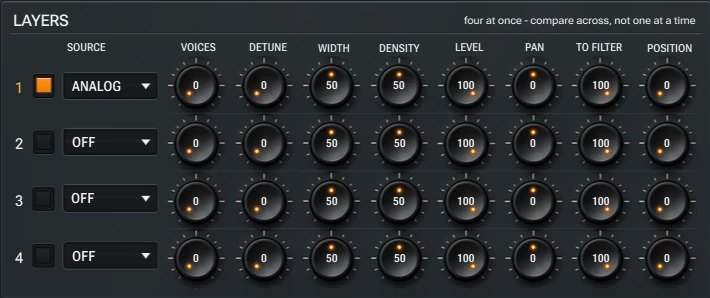
Every note plays all the layers that are on. Each row is one layer, so you can compare them across. Click a row’s square to switch the layer on or off, and click the row to edit its sound in SOURCE.
| Control | What it does |
|---|---|
| SOURCE | The layer’s sound engine: ANALOG, NOISE, FM, SYNC, PULSE or OFF. |
| VOICES | How many unison voices the layer stacks on each note, up to nine. At 0 it plays one. |
| DETUNE | How far the unison voices are tuned apart. A little thickens; a lot gives the shimmering supersaw sound. |
| WIDTH | How wide the unison voices spread across the stereo field. |
| DENSITY | How the unison voices are placed: gathered toward the centre or spread evenly. |
| LEVEL · PAN | The layer’s volume and its place in the stereo field. |
| TO FILTER | How much of the layer goes through the filters. The rest goes around them, so a sub can stay clean under a filtered lead. |
| POSITION | Where the layer enters the filters: at 0 into filter 1, turned up into filter 2. |
8.2.5 Source
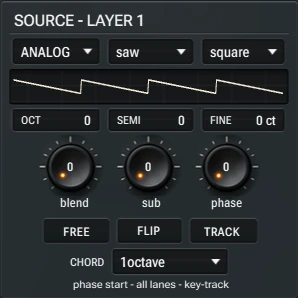
The top row picks the layer’s engine and its two waves, and the display draws the wave. Below it, OCT (±4 octaves), SEMI (±12 semitones) and FINE (±100 cents) tune the layer. The first two knobs change with the engine:
| Engine | Waves | Knobs |
|---|---|---|
| ANALOG | saw, square, triangle or sine, mixed with square, saw, sub sine or none | blend between the two waves · sub an octave below |
| NOISE | white, pink or band noise | colour · band width |
| FM | sine, triangle or saw, modulated by sine, saw or square | fm index (how bright and metallic) · fm ratio |
| SYNC | saw, square or sine | sync ratio for the classic tearing sync sound · ring depth |
| PULSE | pulse or saw, mixed with saw, sub pulse or none | pulse width · blend |
- phase: where the wave starts on each note. With FREE on, the waves run freely from note to note instead, for a looser sound.
- FLIP turns every other unison voice upside down, for a hollower, wider stack.
- TRACK keeps the beating of the detuned voices at the same speed all over the keyboard, so high notes don’t sound more out of tune than low ones.
- CHORD spreads the unison voices over a chord instead of one note: octaves, augmented, major and minor 3rds, 7ths and 9ths, diminished, fifths, fourths and sus chords, 21 shapes in all. A chord sounds whole when VOICES is at least as high as its number of notes.
- The line at the bottom sums up the layer’s phase, chord and tracking settings.
8.2.6 Filters
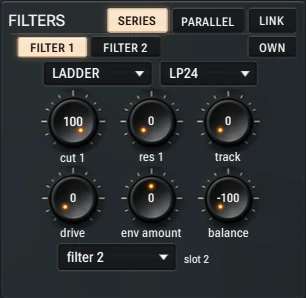
- SERIES · PARALLEL: the two filters one after the other, or side by side with balance between them.
- LINK makes cut 2 follow cut 1, so one knob sweeps both filters and cut 2 sets the distance between them.
- FILTER 1 · FILTER 2 show each filter’s controls. Filter 2 follows filter 1’s type, tracking and envelope until you switch on OWN.
- slot 2: filter 2, or a saturate or fold shaper in its place.
| Family | Types |
|---|---|
| LADDER | LP 12, LP 18, LP 24, HP 24: the warm, classic synth filter |
| STATE | LP 12, BP 12, HP 12, NOTCH, PEAK: clean and precise |
| COMB | MONO +, MONO −, STEREO +, STEREO −: metallic, tuned and flanged tones |
| DRIVE | SATURATE, FOLD: a shaper in the filter’s place |
cut and res set each filter’s cutoff and resonance; track how much the cutoff follows the keys; drive pushes the filter for grit; env amount (−100 to +100) how far ENV2 opens or closes it.
8.2.7 Voice
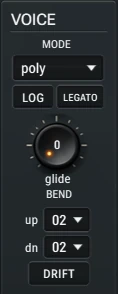
- MODE: poly plays chords; mono plays one note at a time; legato plays one note and doesn’t restart the envelopes when notes overlap. The top bar’s VOICES sets how many notes poly can play: 2, 4, 8 or 16.
- glide: how long the pitch slides from one note to the next. LOG gives a natural, curved slide; LEGATO glides only between overlapping notes.
- BEND up · dn: the pitch bend range, 2, 12 or 24 semitones each way.
- DRIFT adds the small, slow tuning wander of an analogue synth.
8.2.8 Shapers: envelopes, LFOs and steppers
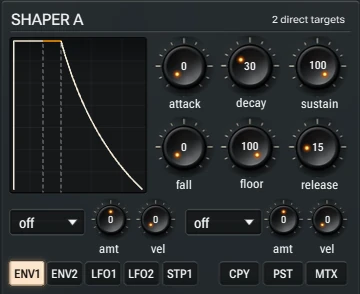
The two shapers hold Sonic’s modulators, one tab at a time. SHAPER A has ENV1, ENV2, LFO1, LFO2 and STP1; SHAPER B has ENV3, ENV4, LFO3, LFO4, STP2 and the ARP. CPY and PST copy a tab’s settings to another tab, and MTX opens the matrix.
Envelopes
Each envelope has six stages: attack, decay and sustain, then fall and floor, an extra slope that slowly lowers the held level to a second level while the key is down, and release. With fall at 0 and floor at 100 it is a normal ADSR. ENV1 always shapes the volume, and ENV2 is the filters’ envelope (their env amount).
LFOs
Each LFO has a shape (sine, triangle, saw, square or sample & hold), a rate, SYNC to lock it to the tempo, RTG to restart it on every note, a starting phase and a fade-in.
Step sequencers
STP1 and STP2 play 16 steps of your own values. With SYNC on, a step lasts a 1/16, 1/8 or 1/32 note; with it off, set the speed with rate. LOOP repeats the 16 steps (off: they play once from the first note), glide slides between them and swing gives them a groove.
Direct targets
Every envelope and LFO has two targets, and each stepper one, right on its tab: choose cutoff, detune, width, level, pan, pitch or position, then set amt (−100 to +100; negative pushes the other way) and vel (how much harder playing adds).
8.2.9 Arpeggiator
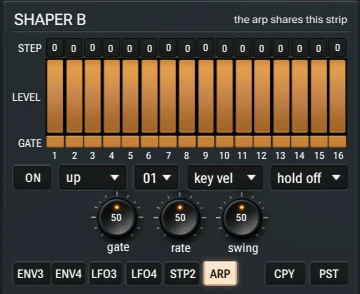
- ON starts the arp; it plays the keys you hold, in time with the song.
- The mode: up, down, up/down, random or chord (every held key at once, as a rhythm). Random plays the same way on every playback.
- Octaves 01 to 04; key vel (the velocity you play) or step vel (each step’s LEVEL); hold on keeps the pattern going after you let go.
- gate: how long each note plays. rate: from 1/2 to 1/64 notes, 1/16 in the middle. swing for groove.
- The 16 steps: STEP transposes each step (±24 semitones), the bars set its LEVEL, and the GATE row switches it on or off.
8.2.10 Effects
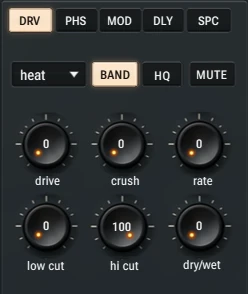
Five effects run in this order: drive, phaser, modulation, delay and space. Click a tab to show its page; each has a type, its own switches, six knobs and MUTE. Every effect is fully dry with dry/wet at 0.
| Page | Types | Switches | Knobs |
|---|---|---|---|
| DRV | heat (warm), clip (hard), fold | BAND drives only the band between low cut and hi cut, so the bass stays solid under a driven top; HQ higher quality | drive · crush (bit depth) · rate (lo-fi sample rate) · low cut · hi cut · dry/wet |
| PHS | phaser, vowel | PRE puts it before the drive | rate · depth · feedbk · low cut · spread · dry/wet |
| MOD | chorus, flanger | SYNC to the tempo | rate · depth · delay · spread · tone · dry/wet |
| DLY | free (10 ms to 2 s) or 1/2, 1/4 D, 1/4, 1/8 D, 1/8, 1/8 T, 1/16 D, 1/16, 1/32 | PING ping-pong; DUCK dips the echoes while you play | time · feedbk · low cut · hi cut · spread · dry/wet |
| SPC | hall, room, plate | PRE puts the reverb before the delay; DUCK | size · decay · damp · low cut · pre dly · dry/wet |
The delay’s low and high cuts sit in its feedback, so every repeat gets a little thinner and darker, like tape.
8.2.11 Output
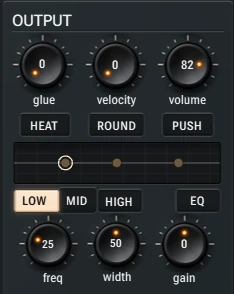
- glue: a bus compressor that pulls the layers together. velocity: how much the volume follows how hard you play. volume: the patch’s level.
- HEAT adds warmth and gentle saturation; ROUND softens the top; PUSH makes the patch louder.
- The EQ has three bands: LOW (a low shelf), MID (a bell) and HIGH (a high shelf). Pick a band, then set its freq (30 Hz to 16 kHz), width and gain (±15 dB); the curve shows all three. EQ switches the whole EQ on or off.
- A safety limiter at the very end keeps sudden peaks from clipping.
8.2.12 Matrix and macros
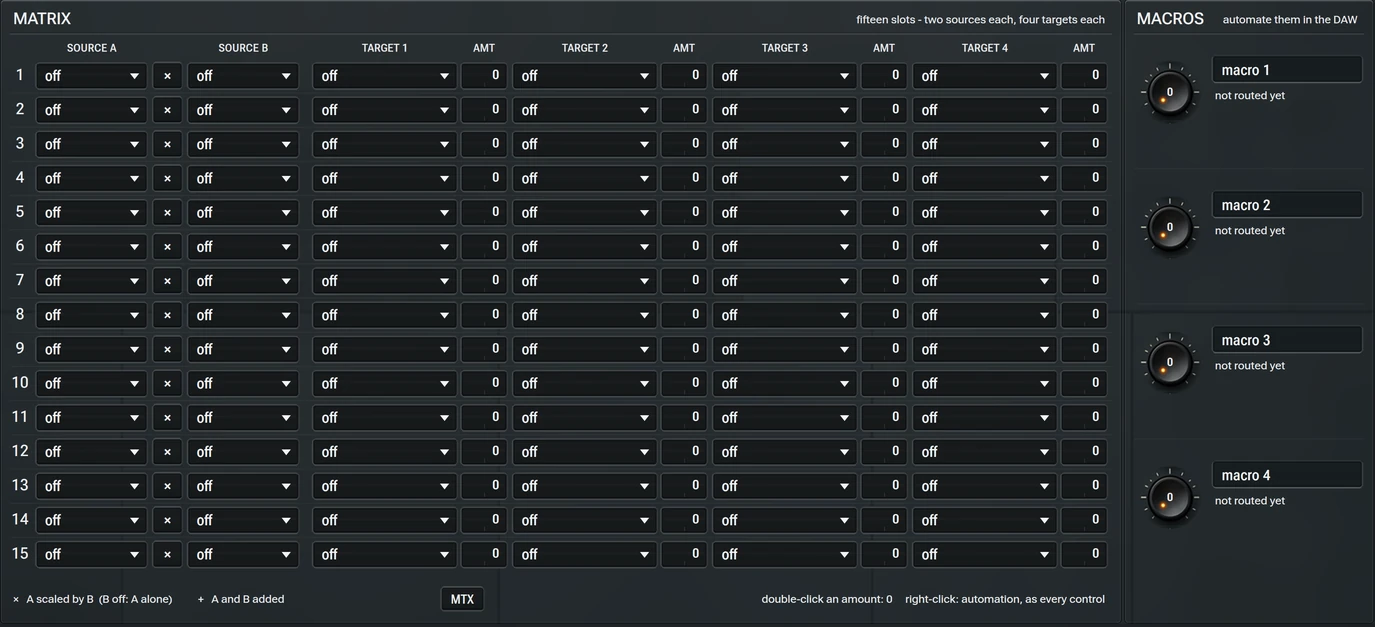
Click MTX to open the matrix, and again to go back. Each of the fifteen slots takes SOURCE A and SOURCE B: with × A is scaled by B (B off: A alone), with + they are added. The result moves up to four targets, each with its own amount from −100 to +100.
- Sources: the four envelopes, four LFOs and two steppers, velocity, key, mod wheel, aftertouch, polyphonic aftertouch, pitch bend, the four macros and random.
- Targets: pitch, volume, pan and glide; any layer’s level, pan, pitch, detune, width, source knobs, to filter and position; the filters; the envelopes’ stages; the LFOs’ rate and amount; every effect knob; volume, glue and the EQ bands.
- Macros: four knobs to route anywhere in the matrix. Double-click a macro’s name to type your own, and automate the macros in the DAW to move a whole sound with one lane.
Double-click an amount to set it to 0.
8.2.13 The preset browser
LIBRARY opens the preset browser: banks, categories and tags on the left, the patches on the right, and a search box.
- Click a patch to hear it. LOAD keeps it; CANCEL puts back what was playing.
- The tags narrow the list: BRIGHT, DARK, WIDE, MONO, MOVING, CLEAN, GRITTY, SHORT and EVOLVING. Mark favourites with a star.
- The factory bank has 120 patches in eight categories of fifteen: Arp, Bass, Chord, FX, Keys, Lead, Pad and Pluck. Each has a short note on how to play it and up to four named macros, and all sit at the same loudness, so you compare sounds, not levels.
- Factory patches can’t be overwritten: change one and save as… a new patch. Your own patches are saved in your user folder (Settings › Locations), each as a small file you can copy to another computer.
8.2.14 Knobs and buttons
| Do this | To |
|---|---|
| Drag a knob up or down | Change it. |
| Mouse wheel over a knob | Change it in small steps. |
| Click a box with ▾ | Choose from its list. |
| Right-click a control | Create, edit or clear its automation. |
8.2.15 Good to know
- Everything plays in time. The arp, the steppers, synced LFOs and the delay follow the song’s tempo, and land on the right step after a jump or a loop.
- Big stacks, clear sound. Unison voices are kept apart, so a thick stack stays clear instead of turning to mush.
- A/B in one click. Try a change on B, compare with A, and keep the one you like.
8.2.16 Recipes
Festival supersaw
Layer 1 ANALOG saw, VOICES high, DETUNE around 60, WIDTH 80. Layer 2 the same an octave down with fewer voices. Glue 30, SPC hall with dry/wet 25, and DLY 1/8 D with PING.
Deep house chord
One ANALOG layer with CHORD set to minor 7th and VOICES at 4 or more, a LADDER LP 24 with cut 1 low, env amount up and a short ENV2 decay. Add MOD chorus.
Rolling bass
MODE mono, one ANALOG saw with sub up, LADDER LP 24 with some resonance, and LFO1 on cutoff with SYNC at a 1/16 feel. Keep TO FILTER at 100 and the delay and reverb off.
Trance gate pad
A wide pad on two layers, then STP1 on level with alternating high and low steps at 1/16 and LOOP on.
Arp from a chord
Open the ARP tab, switch it ON, choose up over 02 octaves at 1/16, and hold a chord. Lower a few steps’ LEVEL and switch some GATE steps off for a rhythm.
8.2.17 Troubleshooting
No sound. Check that Sonic’s power is on, that at least one layer is switched on with a SOURCE other than OFF, and that its LEVEL and the output volume are up.
A chord on CHORD sounds thin. Raise the layer’s VOICES: a chord sounds whole only with at least as many voices as it has notes.
The arp doesn’t play. Switch it ON in the ARP tab and hold some keys. Press play if you want it locked to the song.
The sound is too loud or too quiet after a change. Use volume in OUTPUT. PUSH adds level, and the limiter at the end holds the peaks.
Didn’t find what you need? Contact us.