8.4 Harmonic Classic
A 6-voice analog-style polysynth with three oscillators, a ladder filter, poly mod, two effects, an arpeggiator and a step sequencer. 130 patches.

Harmonic Classic is a six-voice analog-style polysynth in the spirit of the great studio synths of the late 1970s and 80s. Warm, fat and alive, with every control on one panel and nothing hidden behind menus.
Three oscillators with mixable waveforms feed a resonant ladder filter that can scream into self-oscillation. Poly mod turns it into a sync and FM machine, and aftertouch can reach the pitch, filter, level and effects. Two effect slots, from tape-style echo and chorus to hall, plate and spring reverb, are built in, along with an arpeggiator, a 64-step sequencer, chord memory and unison. It comes with 130 patches, from deep basses and brass to pads, plucks, arps and sequences.
- Three oscillatorsTriangle, saw and pulse on each, in any mix, with pulse width, hard sync and a third oscillator that can turn into a modulator.
- Ladder filterSmooth or aggressive, 4-pole or 2-pole, with its own envelope, key tracking and resonance that sings on its own.
- Feedback and driveOne knob pushes the voice into warm drive one way and into rich, harmonic feedback the other.
- Poly modOscillator 3 and the filter envelope can sweep pitch, pulse width, feedback and the filter of every voice: classic sync leads, bells and growls.
- Expressive playingVelocity, mod wheel, pitch bend up to an octave, and channel or per-note aftertouch with four response curves.
- Two effect slotsBucket-brigade and digital delay, chorus, three phasers, two flangers, ring modulator, plus hall, room, plate and spring reverb.
- Arpeggiator and sequencerFive arp modes over up to three octaves, and a 64-step sequencer that records chords, rests and ties, all locked to the song tempo.
- Mono, unison and chordFrom 1 to 6 voices, a stacked unison sound, chord memory, glide and key priority, like the real thing.
- VintageGives every voice its own small differences in tuning, filter and timing, from perfectly clean to gently drifting.
- 130 factory patchesBass, brass, strings, pads, leads, sync, keys, plucks, arps and sequences, with a fast browser, search and favourites.
- Three quality modesEco to save computer power, Studio for everyday use, and Render for the very best, which every export uses automatically.
- Made for the studioResizable window, full automation, compare against the saved patch, and patches you can copy between computers.
8.4.1 Adding Harmonic Classic
- Create an instrument track and choose Harmonic Classic as its instrument.
- Its window opens. Play your keyboard, or click the keys at the bottom of the window.
- Click BROWSE to pick one of the 130 factory patches, or start shaping the sound from the first patch.
A new Harmonic Classic starts on Init: a single saw wave through the filter, a clean starting point for your own sounds.
8.4.2 Quick start: your first patch
- In OSCILLATORS, light SAW on oscillators 1 and 2, and turn oscillator 2’s PITCH a little away from the centre for a thick, beating sound.
- In FILTER, turn CUTOFF down until the sound gets darker, then raise RESONANCE for a sharper edge.
- Raise ENV AMT and set the FILTER ENVELOPE DECAY: each note now opens bright and closes down, the classic synth “pluck”.
- Shape the volume with the AMPLIFIER envelope: short ATTACK and RELEASE for plucks and bass, long ones for pads.
- Turn FX on for chorus and hall, and set their DRY/WET to taste.
- Click SAVE AS to keep it.
8.4.3 The window

- Patch display: the patch’s code in amber, its name, and a line that describes it, for example F090 Pluck · edited · factory · plucks · poly · 6 voices. edited appears as soon as you change anything. Click the code (or its ▾) to open the browser.
- ‹ › step to the previous or next patch, factory patches first, then yours.
- BROWSE, SAVE AS and COMPARE: see Patches.
- VOICES 1–6: each light shows a voice that is sounding right now.
- ECO · STUDIO · RENDER: the sound quality (see Quality).
- PATCH LEVEL: the patch’s output level. 70 % is the normal level; turn it up for a louder patch.
The window can be resized by dragging any edge or corner, from half to twice its normal size. Drag the title bar to move it, and double-click it to fill the screen.
8.4.4 Oscillators
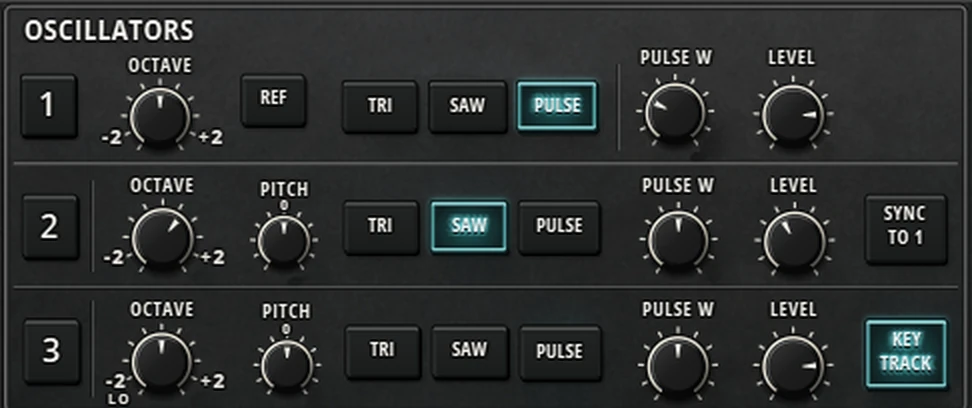
| Control | Range | What it does |
|---|---|---|
| OCTAVE | −2 to +2 octaves | The oscillator’s octave. Oscillator 3 has one more step below −2: LO (see below). |
| PITCH (oscillators 2 and 3) | ±7 semitones | Tunes the oscillator against oscillator 1. Near the centre it moves in fine cents, for gentle detune; further out it reaches a fifth (+7) or a fourth below (−7). It clicks onto the exact centre. |
| TRI · SAW · PULSE | Any combination | The waveforms. Light one, two or all three to mix them. On oscillator 3, clicking SAW again gives a reversed saw (REV SAW), and a third click turns it off. |
| PULSE W | 5 to 95 % | The width of the pulse wave: 50 % is a hollow square; narrow widths are thin and nasal. |
| LEVEL | 0 to 100 % | How loud the oscillator is in the mix. |
| REF (row 1) | Button | Puts oscillators 2 and 3 back in tune with oscillator 1 in one click. |
| SYNC TO 1 (row 2) | On / off | Hard sync: oscillator 1 restarts oscillator 2 on every cycle. Raise oscillator 2’s pitch (or sweep it with poly mod) for the classic tearing sync lead. |
| KEY TRACK (row 3) | On / off | When off, oscillator 3 plays one fixed note whatever key you press: a drone, or a steady source for poly mod. |
8.4.5 Mix and Drive
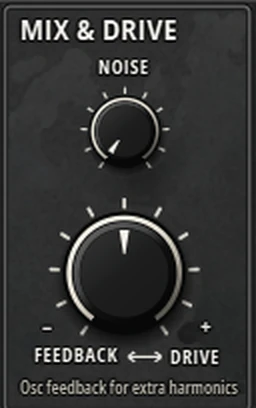
- NOISE (0 to 100 %): adds noise to the oscillators, for breath, wind, hi-hats and sweeps.
- FEEDBACK ↔ DRIVE (−100 to +100 %): one knob, two effects. To the right it drives the oscillators harder into the filter, for warm saturation without getting louder. To the left it feeds the voice back into itself, adding rich extra harmonics, and turns wild near the end. At the centre it does nothing.
8.4.6 Filter
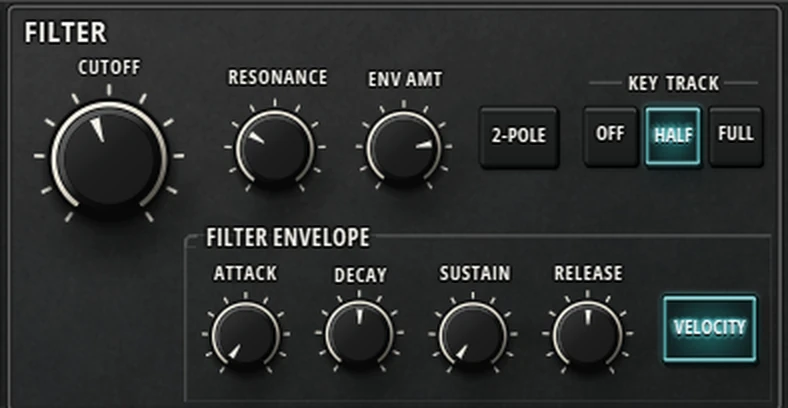
| Control | Range | What it does |
|---|---|---|
| CUTOFF | 20 Hz to 20 kHz | How bright the sound is. Lower it to make the sound darker and rounder. |
| RESONANCE | 0 to 100 % | Boosts the sound around the cutoff for a sharper, vocal edge. Near the top the filter starts to whistle on its own and can be played as a pure tone. Like a real ladder filter, more resonance thins the low end a little. |
| ENV AMT | −100 to +100 % | How far the filter envelope moves the cutoff. Negative values sweep it down instead of up. |
| 2-POLE | On / off | A gentler filter slope: brighter and more open than the normal, steeper 4-pole sound. |
| KEY TRACK | OFF · HALF · FULL | How much the cutoff follows the notes you play. FULL keeps the brightness the same up the keyboard; OFF makes high notes darker. Middle C (C4) always uses the knob’s own cutoff. |
| FILTER ENVELOPE | ATTACK, DECAY, RELEASE 1 ms to 30 s; SUSTAIN 0 to 100 % | The shape the cutoff follows on each note. |
| VELOCITY | On / off | Harder notes open the filter further. |
8.4.7 Amplifier
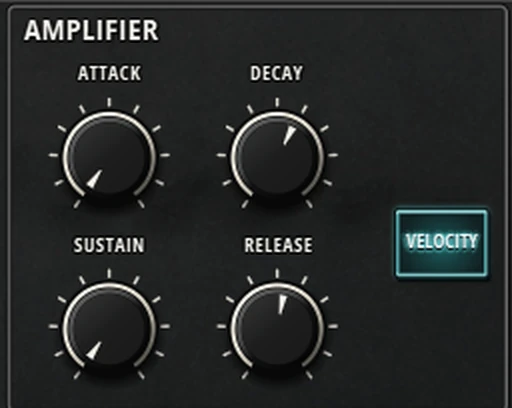
- ATTACK, DECAY, RELEASE (1 ms to 30 s) and SUSTAIN (0 to 100 %) shape the volume of each note: how fast it starts, how it falls to the held level, and how long it rings after you let go. The curves are smooth and natural, and a note played again starts from where it is, without a click.
- VELOCITY: when on, harder notes are louder. When off, every note plays at full level.
8.4.8 LFO
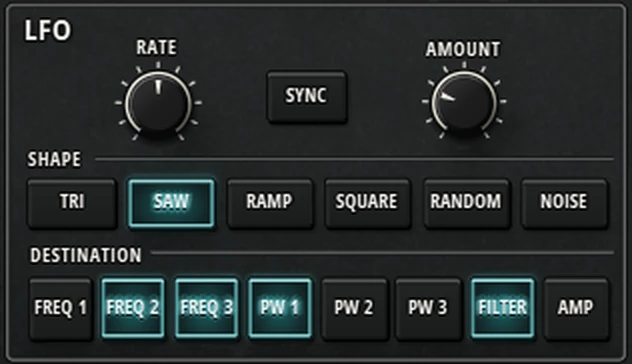
- RATE: 0.05 to 50 Hz. With SYNC on, it locks to the song tempo in note values from 1/2 down to 1/32, including dotted and triplet values.
- AMOUNT: how strong the LFO is. The MOD wheel adds to it, so you can bring vibrato in while you play.
- SHAPE: TRI, SAW (falling), RAMP (rising), SQUARE, RANDOM (a new step each cycle) and NOISE (fast random).
- DESTINATION: light any number of FREQ 1–3 (pitch), PW 1–3 (pulse width), FILTER and AMP (tremolo). Pitch is gentle at low amounts, for natural vibrato, and reaches an octave at full.
The LFO is shared by all voices and starts its cycle again when you play a note after letting go of all keys.
8.4.9 Poly mod
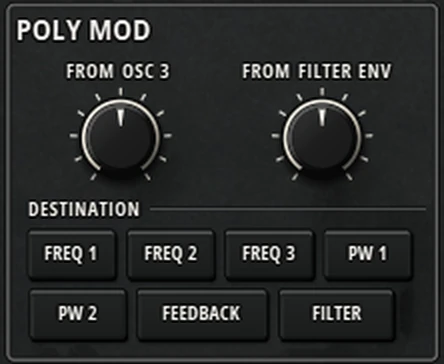
Poly mod lets each voice modulate itself, at audio speed. It is the secret behind sync sweeps, metallic bells and growling basses.
- FROM OSC 3 (−100 to +100 %): oscillator 3’s wave as a modulator. At low settings it adds movement; at high settings on FREQ it gives FM tones and bells.
- FROM FILTER ENV (−100 to +100 %): the filter envelope as a modulator. On FREQ 2 with SYNC TO 1 it gives the classic sweeping sync lead.
- DESTINATION: any number of FREQ 1–3, PW 1–2, FEEDBACK and FILTER.
8.4.10 Aftertouch
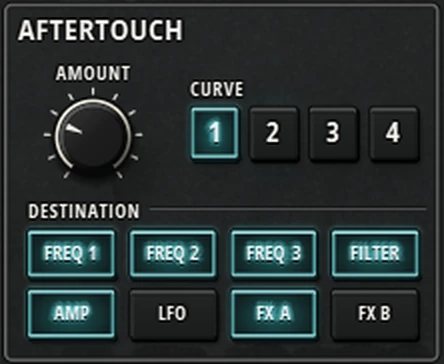
- AMOUNT (−100 to +100 %): how much pressing harder changes the sound. Negative values work the other way round.
- CURVE: 1 even, 2 soft (reacts early), 3 hard (reacts late), 4 S-curve (gentle at both ends).
- DESTINATION: any number of FREQ 1–3 (pitch), FILTER, AMP (louder), LFO (more LFO) and FX A / FX B (more of that effect).
Harmonic Classic responds to both channel aftertouch and per-note (polyphonic) aftertouch, so on a keyboard with poly aftertouch each note can be shaped on its own.
8.4.11 Distortion and effects
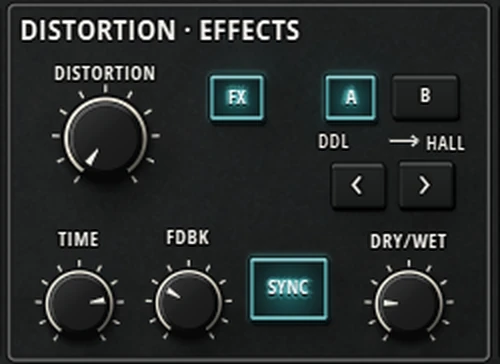
- DISTORTION (0 to 100 %): from gentle warmth to hard clipping, on the whole instrument. It changes the tone, not the volume.
- FX switches both effect slots on or off.
- A · B chooses which slot the knobs below are editing. The two types in use are shown (for example DDL → HALL), and ‹ › change the type of the selected slot.
- The two knobs change with the effect (TIME and FDBK for a delay, RATE and DEPTH for chorus, phaser and flanger, DECAY and EARLY for a reverb). DRY/WET sets how much of the effect you hear.
- SYNC locks delay times and modulation rates to the song tempo.
| Effect | Slot | Sound |
|---|---|---|
| BBD | A or B | Warm bucket-brigade echo: each repeat is darker, and changing the time bends the pitch. At full feedback it runs away into wild self-oscillation. |
| DDL | A or B | Clean digital delay, 5 ms to 1 s. Full feedback holds the repeats. |
| CHORUS | A or B | Wide stereo chorus: the classic thick, shimmering synth sound. |
| PHASE 1 · 2 · 3 | A or B | Phasers from strongly resonant (1) to smooth (3). PHASE 3 speeds up and slows down gently, like a rotating speaker. |
| RING | A or B | Ring modulator for bells and metallic tones. With TRACK on, it follows the notes you play. |
| FLANGE 1 · 2 | A or B | Jet-like flanger, strong (1) or soft (2). |
| HALL · ROOM · PLATE | B only | Reverbs: HALL up to 12 s, ROOM up to 3 s, PLATE up to 8 s. EARLY sets the level of the first reflections. |
| SPRING | B only | The boingy spring reverb of a guitar amp. TONE goes from dark to bright. |
8.4.12 Arpeggiator and sequencer
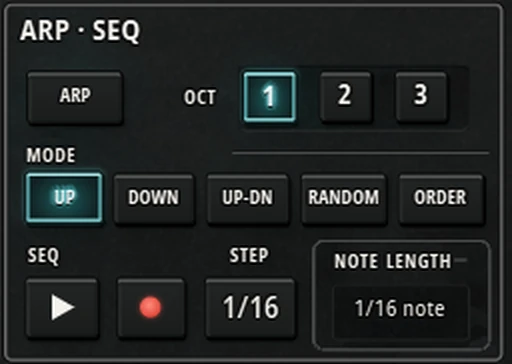
Arpeggiator
- ARP turns it on. Hold a chord and its notes play one after another.
- OCT 1 · 2 · 3: how many octaves it climbs through.
- MODE: UP, DOWN, UP-DN (without repeating the top and bottom notes), RANDOM (never the same note twice in a row, and the same every time the song plays) and ORDER (the order you pressed the keys).
- Each note keeps the velocity you played it with.
Step sequencer
- Press ● (record) and play: each note or chord becomes a step when you let go of its keys. Press STEP with no keys held for a rest, or while holding keys for a tie. A sequence can have up to 64 steps of up to six notes each.
- Press ▶ (play) and hold a key: the sequence plays, transposed by how far the key is from middle C. Let go and it stops, or turn on HOLD to keep it running.
- The sequence is saved with the patch.
Timing
- STEP sets the speed: 1/2, 1/4, 1/8, 1/16 or 1/32, plus dotted (D), triplet (T) and swing (S) values. Click it to step through them.
- NOTE LENGTH sets how long each note lasts, from 1/64 note to 1/4 note, or legato for notes that touch. Click it to change it.
- While the song plays, the arp and sequencer lock to its beat; when stopped, they start with your first key.
ARP, sequencer play and sequencer record are one at a time: turning one on turns the others off.
8.4.13 Performance

| Control | What it does |
|---|---|
| TRANSPOSE ‹ › | Moves the whole keyboard up or down by octaves, two each way. The lights show where you are. |
| HOLD | Keeps notes sounding after you let go, like a sustain pedal. Also keeps the arpeggiator and sequencer running. |
| GLIDE knob, GLIDE | Portamento: notes slide into each other. The knob sets how slowly. |
| RATE · TIME | RATE: the slide takes longer for bigger jumps. TIME: every slide takes the same time. |
| LEGATO | Slides only when you play a note while another is still held. |
| VOICES − + | 1 to 6 voices. 1 makes it a mono synth. With UNISON on, it is how many voices are stacked. |
| UNISON | Stacks the voices on one note for a huge sound. Turn up VINTAGE to spread their tuning; at VINTAGE 0 they are in perfect tune. |
| CHORD | Chord memory: hold a chord and press CHORD, and from then on every key plays that chord, moved to that key. Press it with no keys held to turn it off or on; the chord is kept. |
| KEY PRIORITY LOW · HIGH · LAST | In mono, unison and chord modes, which held key plays: the lowest, the highest or the last pressed. Letting go returns to another held key. |
| RETRIG | In those modes, restarts the envelopes on every new key. Turn it off for smooth, connected lines. |
| VINTAGE | Gives every voice its own small differences in tuning, filter, envelopes and glide, plus a slow drift: the character of an old analog synth. At 0 every voice is identical. The pattern is saved with the patch, so it sounds the same every time. |
| PAN SPREAD | Spreads the voices across the stereo field. At 0 the instrument is mono. |
| BEND − + | The pitch-bend range, 0 to 12 semitones (shown as BEND 2, BEND 3 …). |
8.4.14 The keyboard and wheels

- Keys: click to play. Click near the front of a key to play louder, near the back to play softer. Drag across the keys to play a run. The keys light up when the track plays, including from your MIDI keyboard.
- PITCH: drag up or down to bend; it springs back when you let go.
- MOD: drag up to add LFO; it stays where you leave it.
- Both wheels follow the wheels on your MIDI keyboard.
8.4.15 Patches
Browsing
Click BROWSE (or the patch code) to open the patch browser over the panel.
- On the left, Factory and User, each with its categories. At the top, BANKS and ★ FAVOURITES, and a search box.
- Click a patch to hear it straight away. Keep clicking to compare patches while you play. Done (or Enter, or double-click) keeps the one you are hearing; Put back (or Esc) returns to the patch you started with.
- The arrow keys move through the list, and typing anywhere searches by name, category and description, across all banks.
- INIT loads the clean starting patch.
- Star a patch to add it to your favourites.
- Right-click a patch to add or remove it from favourites. For your own patches you can also Rename, Move to another category, Duplicate, Show in folder or Delete (deleted patches go to the Recycle Bin, and tracks already using them keep their sound). For a factory patch, Save a copy as… makes your own copy to change.
- Open presets folder shows your patch files.
Factory patches have codes F001 to F130, and your own patches U01, U02 … The patch line under the name describes it: factory or user, its category, and how it plays (poly, mono or unison, glide, arp, chord, seq).
Saving
SAVE AS asks for a name (up to 32 characters) and a category, and saves the patch in your user folder, which you set in Settings › Locations. A patch keeps every setting, including its stored chord, its sequence and its Vintage character. Patch files end in .hcpatch: copy them into a category folder of your user presets to use them on another computer.
Compare
After changing a patch, press COMPARE to hear the saved version; the display reads COMPARING: THE SAVED PATCH. Press it again to go back to your changes, exactly as you left them. Touching any control also returns to your changes.
Factory patches
| Category | Patches | For example |
|---|---|---|
| Bass | 15 | Acid Line, Deep Sub, Donk, Drift Bass, Techstep Growl |
| Brass | 10 | Brass Sweep, Anthem Brass, Fifths Fanfare, Soft Horns |
| Strings | 12 | String Machine, Ensemble Strings, Octave Strings, Trance Strings |
| Pads | 15 | Warm Pad, PWM Pad, Choir Pad, Dream Haze, Warehouse Fog |
| Leads | 15 | Acid Scream, Glide Lead, Mono Lead, Screamer, Stadium Fifths |
| Sync | 10 | Sync Lead, Sync Brass, Breakbeat Sync, Pressure Sync |
| Keys | 12 | FM Bells, Funk Clav, Organ Drawbar, Rave Stab, Deep Ninth |
| Plucks | 14 | Pluck, Analog Harp, Chord Pluck, Synth Pizz, Thumb Piano |
| Arps | 14 | Acid Arp, Arp Pluck, Psy Arp, Swing Arp, Triplet Run |
| Sequences & FX | 13 | Acid Pattern, Techno Pulse, Rave Riser, Laser Zap, Night Wind |
8.4.16 Quality
- ECO: uses the least computer power. Good for big sessions or slower computers.
- STUDIO: the normal setting, for everyday playing and mixing.
- RENDER: the highest quality, with the cleanest highs.
Whatever you choose, exporting, bouncing and freezing always use RENDER quality, so your finished mix gets the best sound. The quality is saved with each patch; changing it never cuts notes that are sounding.
8.4.17 Knobs and buttons
| Do this | To |
|---|---|
| Drag a knob up or down | Turn it. Hold Shift for fine control. |
| Mouse wheel over a knob | Turn it in small steps (Shift for smaller ones). Synced knobs move one note value at a time. |
| Double-click a knob | Reset it. Knobs with a centre (PITCH, ENV AMT, FEEDBACK ↔ DRIVE …) go to the centre, and also click onto it as you pass. |
| Click a button | Turn it on or off, or choose it from its group. Waveform and destination buttons can be combined. |
8.4.18 Good to know
- Up to six voices. When you play more notes than voices, the note that was released longest ago (or held longest) gives way.
- MIDI: velocity, pitch bend, mod wheel, sustain pedal, channel aftertouch and polyphonic aftertouch.
- Tempo: the LFO, effects, arpeggiator and sequencer follow the song tempo (120 BPM when there is none).
- Latency: a tiny fixed delay, well under a millisecond, which Harmonic Pro Studio makes up for automatically.
- Automation: every control on the panel can be automated. See the Automation editor.
8.4.19 Recipes
Fat analog bass
Oscillators 1 and 2 on SAW, oscillator 2 OCTAVE −1. CUTOFF low, RESONANCE 20–30 %, ENV AMT +40 %, filter DECAY short. VOICES 1, GLIDE on with a short time.
Classic brass
Two SAWs slightly detuned. Filter ATTACK 50–150 ms so each note swells open, ENV AMT +50 %. Amp SUSTAIN high. VINTAGE 30 %.
Sync lead
Oscillator 2 SAW with SYNC TO 1, its PITCH up several semitones. In POLY MOD, FROM FILTER ENV to FREQ 2, and a fast filter envelope decay. VOICES 1, a little GLIDE.
Lush pad
PULSE on two oscillators, LFO TRI slowly on PW 1 and PW 2. Long amp ATTACK and RELEASE. FX on with CHORUS in A and HALL in B. PAN SPREAD 60 %, VINTAGE 40 %.
Bells
Oscillator 1 TRI. Oscillator 3 TRI with KEY TRACK on, OCTAVE +1 or +2, LEVEL 0. POLY MOD FROM OSC 3 into FREQ 1 at 40–70 %. Short amp decay, SUSTAIN 0, long RELEASE. PLATE in slot B.
Huge unison lead
UNISON on with VOICES 6, VINTAGE 50–70 % to spread them, PAN SPREAD 100 %. Add a little DRIVE and a DDL echo.
8.4.20 Troubleshooting
No sound. Check that at least one waveform is lit and that oscillator LEVEL, CUTOFF and PATCH LEVEL are not at 0. Init only has SAW on oscillator 1.
Notes cut off when I play a lot. You are using more than the voices set with VOICES (or there are only six). Raise VOICES, or shorten the amp RELEASE.
The arp or sequencer doesn’t start. They play while keys are held. For the sequencer, record a sequence first, then press ▶ and hold a key, or use HOLD.
Unison sounds thin. Raise VINTAGE: it sets how far the stacked voices are detuned.
The computer is struggling. Switch to ECO. Your exports will still be made at the highest quality.
Didn’t find what you need? Contact us.