7.2.17 Delay
The echo effect of Harmonic Pro Studio. Echoes on the beat through every tempo change, throws on the last word of each phrase, and repeats that follow the chords.

Delay repeats a track in time with the song. Each repeat is an echo of the one before, a little quieter, until they fade away.
It has what you expect from a delay: echoes on note values locked to the tempo, milliseconds for slapback, feedback, ping-pong, a tone filter on the echoes, tape and analog character, and ducking. And three things that set it apart: it follows the song’s tempo map exactly, it throws only the last word of each phrase into the echo, and its repeats can follow the chords.
- The tempo map, exactlyThe echoes stay on the beat through every tempo change and ramp, and an export sounds exactly like playback.
- Automatic throwsOnly the last word of each phrase goes into the echo. No send automation to draw.
- Echoes that follow the chordsEach repeat climbs or falls to the next note of the chord playing when it sounds.
- Eight stylesClean, Mod, Tape, Analog, Dub, Lo-Fi, Diffuse and Reverse.
- See every repeatThe echo line draws what you will hear, and you can drag it to set TIME and FEEDBACK.
- Throws in one clickRight-click a vocal and choose Delay throws.
What Delay is not. It is not a reverb: for space, use Harmonic Space or the Lite reverb (DIFFUSE smears the echoes into a wash, but they are still echoes). It adds no delay to the track itself: the dry track plays on time and only the echoes come later, so Delay can go anywhere in a rack. And silence stays silence: with nothing playing and the echoes gone, Delay is exactly silent, in every style.
7.2.17.1 Quick start
An echo on a vocal
- Add Delay to the vocal track (the effect picker, under Delay; if it shows a lock, Delay is not in your edition).
- Play. A new Delay starts on Tape Quarter: echoes every 1/4 note, TAPE, FEEDBACK 35 % (7 repeats), mixed in at MIX 30 %.
- Turn FEEDBACK for more or fewer repeats, and HIGH CUT down to sit the echoes behind the voice.
Throws on the last word of each line, in one click
- Right-click the vocal track’s header, or its mixer strip.
- Choose Delay throws ▸ 1/4 (or 1/8 dotted, 1/2, 1 bar).
That is all. A return called “Lead Vox Throws” is made with Delay on it, and the vocal is sent to it. Only the last word of each phrase echoes. It is one undo step (see Delay throws).
Slapback
Load the preset Slapback (MS, 110 ms, mono: a single quick slap whose next repeats fade at once), or pick MS under the TIME dial and set 80–130 ms with a low FEEDBACK.
Shimmer
Load Shimmer Octaves: DIFFUSE with PITCH SHIFT +12. The echo climbs an octave, then a second, and stays there, melting into a wash. Raise FEEDBACK for a longer shimmer.
Echoes that follow the chords
- On a vocal or a lead, in a song with a band or chords playing, set PITCH to CHORD and UP.
- Play. Each repeat lands on the next note of the chord sounding at that moment, and moves with the chord changes.
Or load Chord Climb or Chord Fall. No chord track is needed: Delay hears the chords in the song itself.
A ping-pong synth
Load Synth Ping-Pong (1/16 notes bouncing left, right, left), or pick PING-PONG in the STYLE panel.
7.2.17.2 The window
Delay wears Harmonic Pro Studio’s standard effect face. Open it from the track’s insert rack, as you open any effect.
The title bar

| Part | What it does |
|---|---|
| Power | Switches Delay on and off. Off, the track plays as if Delay were not there, and the echoes stop. |
| The preset box | The preset in use, with ‹ and › to step through presets (see Presets). |
| The place line | Which track and insert slot this Delay is on, for example “LEAD VOX - INS 3”. |
| A/B | Hear the track without Delay, at the same loudness. Click again to go back. |
| Δ | Hear only what Delay adds: the echoes alone. Click again to go back. |
| Close | Closes the window. Delay keeps running. |
The echo line

The wide display at the top shows what you will hear:
- The input (marked IN, or THROW while throws are on) and its repeats on a beat ruler (a ms ruler in MS). Left repeats sit above the line, right ones below, so PING-PONG shows its bounce. Each repeat is as tall as it is loud.
- The style shows on the repeats: TAPE, ANALOG and DUB fade as they go, DIFFUSE smears, REVERSE swells. With PITCH on, each repeat is labelled with its step (+12, +24) or the note it lands on (G4, B4 …).
- The cursor runs from the last note you fed in (or the last throw) and lights each repeat as it sounds.
- Drag the first repeat sideways for TIME (in SYNC it lands on the nearest note value; in MS it goes down to 1 ms). Drag any later repeat up or down for FEEDBACK. Each drag is one undo step.
- The caption says it in words: “EVERY 1/4 · 500 ms · 7 REPEATS · STEREO”, with “THROWS ON PHRASE ENDS” first while throws are on. On the right, the pitch tag: for example “SHIFT +12 ST EACH”, “CHORD UP · HEARS Cmaj7”, “CHORD UP · KEY OF A MINOR” or “CHORD UP · OCTAVES · NO CHORD HEARD”.
- The tone strip under the repeats: drag the left tab for LOW CUT, the right tab for HIGH CUT.
- ECHO on the right: the echoes’ level right now, with “DUCK −9.0 dB” under it while DUCK steps them back.
- While Delay is switched off, ECHO reads −∞, no repeat lights and the cursor stops. The repeats are still drawn, so you see the settings.
The panels and the controls
| Panel | Controls |
|---|---|
| STYLE | The eight style tiles; MONO / STEREO / PING-PONG; AGE and WIDTH |
| TIME · FEEDBACK | The TIME dial with its note marks; SYNC / MS; STRAIGHT / TRIPLET / DOTTED; EXACT (in MS); the FEEDBACK knob and its repeats |
| PITCH · THROW | OFF / SHIFT / CHORD with STEP or UP / DOWN; THROW with its lamp, GAP and BETWEEN |
| TONE · DUCK · MIX | LOW CUT, HIGH CUT, DUCK, MIX |
- Knobs: drag up and down. Hold Ctrl for fine steps. Double-click puts a knob back to its default.
- The TIME dial’s marks: click a mark to jump straight to that note (or, in MS, that time).
- Right-click any control for its menu: type a value, copy or paste it, reset it, and, on the knobs that can be automated, the automation items. On the echo line, the first repeat gives TIME’s menu and a later one FEEDBACK’s; on the tone strip, the nearer cut’s.
- The INFO line at the bottom of the window explains whatever the mouse is over. Delay has no pop-up tooltips: the INFO line is where the help is.
7.2.17.3 TIME
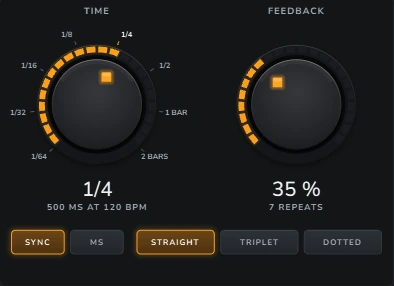
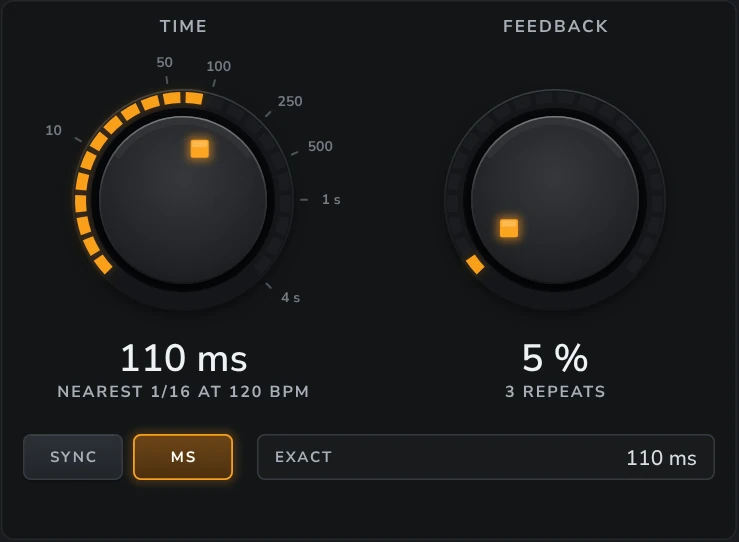
SYNC: note values
TIME is a note at the song’s tempo. It follows every tempo change and ramp, in exports too.
| Note | At 120 BPM |
|---|---|
| 1/64 | 31 ms |
| 1/32 | 62.5 ms |
| 1/16 | 125 ms |
| 1/8 | 250 ms |
| 1/4 | 500 ms (the default) |
| 1/2 | 1 s |
| 1 BAR | 2 s |
| 2 BARS | 4 s |
- STRAIGHT is the plain note, TRIPLET two thirds of it (a swung echo), DOTTED one and a half times it (the classic dotted echo: 1/8 dotted is 375 ms at 120 BPM).
- 1 BAR and 2 BARS follow the song’s time signature: in 3/4, 1 BAR is 3 beats.
- The dial’s readout shows the note and its time at the song’s tempo, for example “500 MS AT 120 BPM”.
MS: milliseconds
Pick MS for a time free of the tempo: 1 ms to 4 s, for slapback and doubling.
- The dial turns on a scale marked 10 ms to 4 s; EXACT sets the time to the millisecond.
- Picking MS starts at the note’s time (up to 4 s): 1/4 at 120 BPM becomes 500 ms, so the echo doesn’t jump.
- The readout also names the nearest note, for example “NEAREST 1/16 AT 120 BPM”.
The longest TIME
The echoes can be up to 10 seconds apart. A longer note (2 BARS at a very slow tempo) is held at 10 s, and the readout says HELD AT 10 s.
Changing TIME while it plays
- A small change (a slow tempo ramp, a gentle turn) glides smoothly in every style.
- TAPE, ANALOG and DUB bend: a bigger change glides like a tape speeding up or slowing down, so the echoes bend in pitch for a moment. That is the sound people want from these styles. A jump too big to bend crossfades instead.
- CLEAN, MOD, LO-FI, DIFFUSE and REVERSE crossfade: the old time fades into the new over 40 ms, with no bend and no click.
- A song that slows down or speeds up stays on the beat, in every style. A ritardando written as small tempo steps is followed exactly.
- After a sudden tempo change (a step of more than 3 %), everything played after it lands on the new beat.
7.2.17.4 FEEDBACK, the tone and the styles
FEEDBACK
How much of each echo comes back as the next one. The knob shows how many repeats you hear above −60 dB:
| FEEDBACK | Repeats |
|---|---|
| 5 % | 3 |
| 35 % (the default) | 7 |
| 50 % | 10 |
| 100 % | HOLDS FOREVER |
At 100 % the echoes never fade, but they never run away either: Delay keeps them under 0 dBFS. In DUB they swell first.
The tone: LOW CUT and HIGH CUT
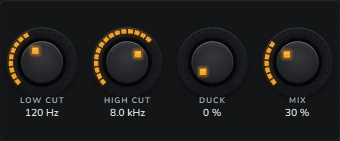
- LOW CUT (20 Hz – 2 kHz, default 120 Hz) thins the echoes, so they never muddy the track.
- HIGH CUT (1 – 20 kHz, default 8 kHz) darkens them, so they sit behind the voice.
- Both are inside the echo: each repeat passes them again, so the echoes get thinner and darker as they fade, as on a hardware delay.
- Turn the knobs, or drag the tabs of the tone strip. The face keeps the two at least 1.5 × apart.
The styles, and AGE
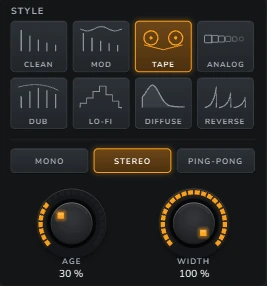
Pick a style with its tile. AGE sets how much of it you hear (default 30 %). Switching style crossfades over 40 ms; the echoes already playing take on the new style.
| Style | The echoes | What AGE does |
|---|---|---|
| CLEAN | Exact repeats; only the tone strip shapes them. | From perfect (0 %) to a 12-bit 1980s unit (100 %). |
| MOD | Clean repeats that slowly swirl, like a chorus on the echoes. | How deep the swirl is. |
| TAPE (the default) | Each repeat a little darker and warmer, with wow, flutter, saturation and a faint hiss (only while the echoes play). | How worn the tape is. |
| ANALOG | A bucket-brigade echo: dark (longer times are darker), soft, a little gritty. | Grit and noise. |
| DUB | A pushed tape echo: forward in the mids, heavy saturation. At AGE 100 % and FEEDBACK from about 90 %, the echoes swell and hold (the dub “siren”) without running away. | How hard the tape is driven. |
| LO-FI | Crunchy repeats: fewer bits and a lower sample rate, like an old sampler. | How crunchy. |
| DIFFUSE | Each repeat smears into the next, so the echoes melt into a wash, still centred on the beat. | How much they smear. |
| REVERSE | Each repeat plays backwards: the echo swells up to the word instead of trailing after it. Even at FEEDBACK 0, the single reversed repeat always plays whole. | How soft the edges of each reversed piece are. |
7.2.17.5 MODE, WIDTH, DUCK and MIX

MODE
- MONO: every repeat in the middle.
- STEREO (the default): left repeats left and right repeats right, so the track keeps its own stereo picture.
- PING-PONG: the repeats bounce, the first on the left, then right, left, right …
WIDTH
How wide the echoes are: 0 % in the middle, 100 % (the default) as wide as the MODE makes them. The dry track is never touched.
DUCK
The echoes step back while the track plays and come up in the gaps, so the words stay clear. 0 % (the default) never ducks; 100 % steps them back by 24 dB. They come back in about half of TIME, 0.06 to 0.6 s. ECHO on the echo line shows the duck as it happens.
MIX
The echoes against the dry track.
- A new Delay starts at 30 %, so it adds echo to the track instead of replacing it.
- On an FX return, use 100 %. Delay throws and Send to new FX set it for you.
- Presets never change MIX, so the same preset works on an insert and on a return.
7.2.17.6 PITCH
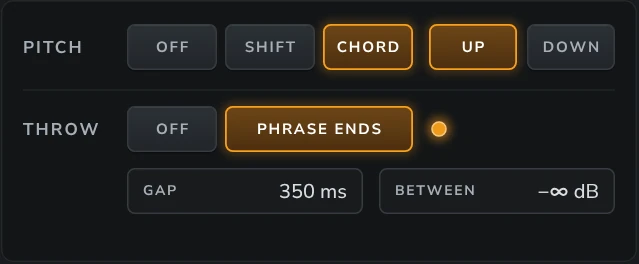
PITCH moves the echoes in pitch. It works on any sound (a voice, a lead, chords) and adds no delay.
SHIFT

Every repeat moves by STEP semitones from the one before it (−12 to +12; default +12):
- +12 climbs an octave, then a second, and stays there: the shimmer sound, best with DIFFUSE.
- +7 climbs in fifths; −12 falls an octave, then a second, and stays there.
- Never past two octaves from the note sung: +12 goes +12, +24, +24 …; +7 goes +7, +14, +21, +24.
CHORD
Every repeat moves to the next note of the chord the song plays when that repeat sounds, UP or DOWN.
- Over C major 7, a sung E4 comes back G4, B4; when the chord changes to A minor 7, the next repeats go C5, E5, G5 … At two octaves they turn round, so the echoes play an arpeggio instead of climbing out of hearing.
- The chords come from the song itself: the MIDI parts, the Arranger band and the band’s audio. No chord track is needed.
- With no chord heard but a key known, the repeats step through the key. With nothing heard, they move in octaves.
- The note you sing comes from the vocal’s clips, which Harmonic Pro Studio hears whole. Everywhere else (a note track, live singing, a clip not heard yet, the song stopped) Delay hears the note itself, from D2 to C6. It works best on a single line: a voice or a lead.
- The pitch tag on the echo line says what CHORD hears: “HEARS Cmaj7”, “KEY OF A MINOR”, or “OCTAVES · NO CHORD HEARD”.
When PITCH can’t run
PITCH needs a little TIME to work in: about 11 ms (15 ms in MOD, TAPE and DUB; 21 ms in DIFFUSE). With a shorter TIME the repeats keep the pitch they were sung at, the pitch tag says NEEDS A LONGER TIME, and the INFO line explains.
7.2.17.7 THROW
PHRASE ENDS
With THROW on PHRASE ENDS, only the last word of each phrase goes into the echo: an automatic throw. The rest of the vocal stays dry.
- On a vocal, Delay knows where each phrase ends before it is sung, because Harmonic Pro Studio hears the whole clip ahead of time. The last word goes into the echo from its very first sample until just after it ends, exactly on time, in playback and in exports.
- GAP (100 ms – 2 s, default 350 ms) is the pause that ends a phrase. Shorter finds more throws; longer only the big pauses.
- BETWEEN (default −∞) is how much of the rest goes into the echo too: −∞ is throws only; −18 dB gives a quiet bed of echo under the throws.
- The lamp flashes on every throw, and the echo line’s cursor runs from it.
- On an FX return, Delay hears the vocal that sends to it. That is how Delay throws works.
With no notes heard
On an instrument, a clip still being heard, or with the song stopped, Delay finds the phrases by level: a word where the sound jumps up after a dip, a phrase end after GAP of quiet. It only knows a phrase has ended once the pause has lasted GAP, so it writes the last word into the echo then. The INFO line says THROWS BY LEVEL while it works this way. Its repeats are on time when TIME is longer than the word plus GAP; with a shorter TIME, the start of the throw is missed.
7.2.17.8 Delay throws
The fastest way to put throws on a vocal. Right-click a track’s header in the timeline, or a mixer strip, and choose Delay throws ▸ (beside Duck to ▸) › 1/4 · 1/8 dotted · 1/2 · 1 bar. The time the throws already play is ticked.
- The first time, it makes an FX return called “<track> Throws”, puts Delay on it at MIX 100 %, set as Phrase Throws at the time you picked (TAPE, FEEDBACK 45 %, THROW on phrase ends, GAP 350 ms, BETWEEN −∞), and sends the track to it at 0 dB, after its fader.
- After that, it uses the same return. Only the time you pick changes, and THROW is switched on; your style, FEEDBACK, MIX and send level are kept.
- It is one undo step: Ctrl+Z takes back the return and the send together.
- On a throws return itself, the item is greyed and reads “(a throws return itself)”: right-click the vocal instead. If the send would loop, nothing is made and the hint bar says why.
7.2.17.9 Presets
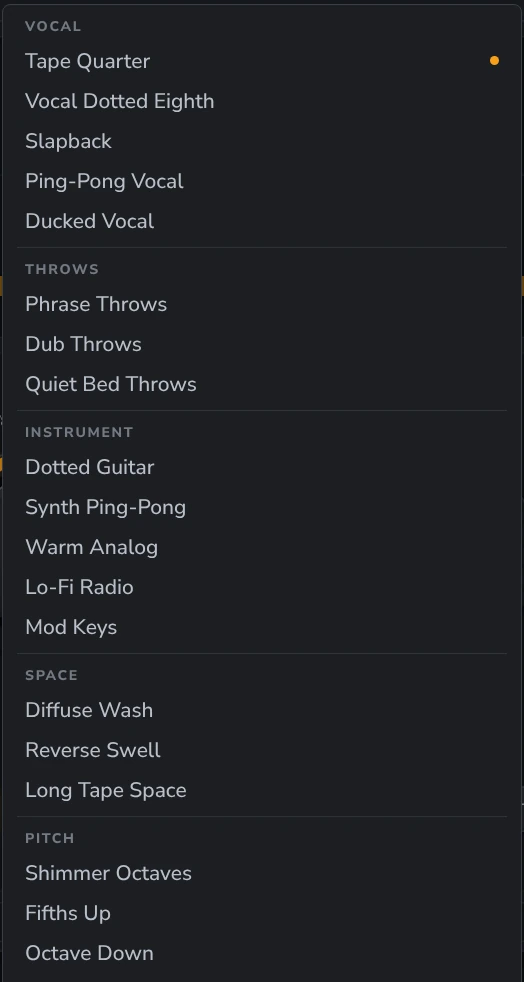
The box in the title bar shows the preset in use and a tag: FACTORY (one that comes with Delay), YOURS (one you saved), EDITED (you changed something since it was loaded) or Custom (the settings are not any preset). When the settings become a preset again, after an undo, automation or a change Nimi makes, the box names it.
| You do | What happens |
|---|---|
| ‹ / › | The previous / next preset in the same folder, round and round. One undo step. |
| Click the name | The preset menu: Factory ▸ Vocal / Throws / Instrument / Space / Pitch, Yours ▸ your folders, then Save, Save As…, Rename…, Delete…, Reset to defaults and Show Presets Folder. |
| Right-click the name | Just the save part: Save, Save As…, Rename…, Delete…, Show Presets Folder. |
| Save / Save As… | Saves your preset (factory presets can’t be overwritten). Save As asks before replacing a name you already have. |
| Delete… | Asks first, then moves one of yours to the Recycle Bin. |
| Reset to defaults | Back to a fresh Delay (Tape Quarter); MIX stays. One undo step. |
- A preset holds every setting and never MIX. Load it on an insert and MIX stays 30 %; on a return it stays 100 %.
- Your presets are kept in your User folder, under Presets › Delay, one folder per category. If your User folder is missing (an unplugged drive, for example), saving is refused and says which folder it is looking for.
- A damaged preset file is listed last in its folder, marked “(damaged)”, and never loads.
The factory presets
| Folder | Preset | What it is |
|---|---|---|
| Vocal | Tape Quarter | A warm tape echo on every beat. A fresh Delay. |
| Vocal | Vocal Dotted Eighth | The classic dotted vocal echo, clean, ducked under the voice. |
| Vocal | Slapback | A single quick, mono tape slap at 110 ms. |
| Vocal | Ping-Pong Vocal | Clean eighths bouncing left and right, ducked. |
| Vocal | Ducked Vocal | Tape quarters that step well back while you sing and bloom in the gaps. |
| Throws | Phrase Throws | Throws on the last word of each phrase, every 1/4 (what Delay throws makes). |
| Throws | Dub Throws | Dotted dub throws that bloom and darken. |
| Throws | Quiet Bed Throws | Dotted-eighth throws over a quiet bed of echo. |
| Instrument | Dotted Guitar | The dotted-eighth guitar echo, clean and a little dark. |
| Instrument | Synth Ping-Pong | Bright sixteenths bouncing left and right. |
| Instrument | Warm Analog | A dark, soft bucket-brigade echo. |
| Instrument | Lo-Fi Radio | Crunchy, narrow-band eighths, like an old radio. |
| Instrument | Mod Keys | Dotted quarters with a chorus swirl, for keys. |
| Space | Diffuse Wash | Half notes melting into a wash. |
| Space | Reverse Swell | Backwards half notes that swell up to each phrase. |
| Space | Long Tape Space | Long, dark tape echoes a bar apart. |
| Pitch | Shimmer Octaves | Echoes climbing an octave, then a second, in a bright wash. |
| Pitch | Fifths Up | Dotted eighths climbing in fifths. |
| Pitch | Octave Down | Echoes falling an octave, then a second. |
| Pitch | Chord Climb | Eighths climbing through the chords the song plays. |
| Pitch | Chord Fall | Quarters falling through the chords the song plays. |
7.2.17.10 In the song
Undo
Every knob turn, every pick (a style, a mode, a note, a feel, PITCH or THROW), every drag on the echo line or the tone strip, loading a preset and Delay throws is one undo step. A/B and Δ are listening switches, not undo steps. Delay’s undo steps follow it if you move it up or down the rack.
Automation
You can automate TIME (in MS), FEEDBACK, AGE, WIDTH, LOW CUT, HIGH CUT, DUCK, MIX and the power. Right-click one of them on the face: Create automation makes the lane on Delay’s own track, starting at the value it has now; Edit automation lane… shows it; Clear automation removes it. A TIME lane glides, bends or crossfades as described in Changing TIME while it plays.
Not automatable: SYNC / MS, the note and the feel, the style, the mode, PITCH, STEP and UP / DOWN, THROW, GAP and BETWEEN.
Saving with the song
Every setting, MIX and the power are saved with your song. A/B and Δ are not, and neither is which preset you loaded: when you reopen the song, the box finds the preset again by its settings.
Playback, exports and bounces
- An export, bounce or freeze sounds exactly like playback, echoes, throws and pitch included.
- An export starts from the song as it is now. Throws and CHORD follow the clips where they are, even one you moved just before you exported.
- Stop cuts the echoes, and a jump clears them. Pause lets them ring out. A loop keeps them ringing across the loop’s end.
- Switching Delay off stops the echoes at once. To let them ring, turn MIX or the send down instead.
- An export’s automatic tail lets the echoes ring out until they are quiet, up to the tail’s longest time in the Export window. With FEEDBACK at 100 % they never fade, so the tail runs to that time.
7.2.17.11 Working with Nimi
Ask Nimi to do anything you can do on the face. Some examples:
| You say | What happens |
|---|---|
| “Put throws on the lead vocal.” | Delay throws, one undo step. |
| “Throws on the vocal, dotted eighths, dub style.” | The same, at 1/8 dotted, DUB. |
| “Make the vocal delay a dotted eighth.” | TIME 1/8 dotted. |
| “Slapback at 110 milliseconds.” | MS, 110 ms. |
| “Give it a tape sound.” / “Make it lo-fi.” | The style. |
| “Shimmer it up an octave.” | PITCH SHIFT +12. |
| “Let the echoes follow the chords down.” | PITCH CHORD, DOWN. |
| “Only echo the last word of each line.” | THROW on PHRASE ENDS. |
| “More repeats.” / “Duck the echoes under the voice.” | FEEDBACK / DUCK. |
| “What is the delay on the vocal doing?” | Nimi reads back the time, the repeats, the style, PITCH and the chord it is following now, the throws so far, and the preset in use. |
| “Save this as Lead Echo.” | Saves your preset, and asks first before replacing one of the same name. |
| “Let me hear just the echoes.” | Switches on Δ, and tells you how to switch it back. |
Every change Nimi makes is one step in the Edit menu’s undo, just like your own.
7.2.17.12 Tips and limits
Keep MIX at 30 % on an insert, 100 % on a return. A preset never changes it, so choose the place first.
Cut the echoes, not the track. LOW CUT around 150–250 Hz and HIGH CUT around 5–8 kHz keep echoes out of the way of a voice.
DUCK keeps busy vocals clear: the echoes come up in the gaps between words.
PITCH needs a little TIME. For a pitched slapback, use at least 20 ms.
CHORD on chords: Delay hears a single line best. On a pad or a chord part, use SHIFT instead.
- A pitched echo can drop a very short click (a lone tick may vanish from one repeat). Tones and words always come through.
- Throws found by level with a short TIME miss the start of each throw. Use a longer TIME, or throws on a vocal whose clips are heard.
- Delay is not a clip effect: use it in a track’s rack or on a return.
- FEEDBACK at 100 % holds the echoes forever; remember it when you export.
Didn’t find what you need? Contact us.