8.5 HPS Piano
Three pianos on one track: a recorded grand, a soft felt piano and a classic electric piano, with tone, echo, reverb and 40 ready-made sounds.

HPS Piano is Harmonic Pro Studio’s piano. One track holds three pianos: a real grand piano recorded note by note, the same grand with soft felt hammers for film and quiet songs, and a classic suitcase electric piano.
Seven knobs shape the piano itself, from its tone and touch to how long it rings. A row of effects finishes the sound the way a piano player would: tone, drive, compression, chorus, an echo on the song’s tempo, a reverb, width and a safety limiter. Forty factory sounds are ready to play, and you can save your own.
- A recorded grandEvery note recorded at 16 strengths, with its dampers, its sustain pedal and the sound of its keys. It streams from your disk as you play.
- Three pianosGrand, Cinematic and Electric, all at the same loudness, so you can switch without touching the volume.
- Plays like a pianoYour keyboard’s velocity, the sustain pedal with half pedalling, the sostenuto and the soft pedal.
- Seven piano knobsBrightness, the hammers’ hardness, dynamics, a swell, decay, release and an old piano’s tuning.
- Effects insideLow and high tone, drive, compression, chorus, a tempo-locked echo in eight styles, a reverb in seven spaces, width and a limiter.
- 40 factory soundsSix groups, from concert grand to lo-fi tape piano and shimmering pads, each at the same loudness.
What HPS Piano is not. It is not a sampler: it plays its own pianos only. It is not an organ or a synth: for those, use Sonic or Harmonic Classic. And it has no velocity curve of its own yet: it plays the velocity your keyboard sends.
8.5.1 Adding HPS Piano
- Create an instrument track and choose HPS Piano as its instrument (the Instruments browser, or the track’s instrument slot). It comes with every edition.
- Its window opens. Click the keys on the face, or play your MIDI keyboard on the armed track.
A new HPS Piano starts on Default: the Grand, every knob at home, the LIMITER on.
8.5.2 Quick start
Pick a factory sound
- Click the name on the preset bar at the top. The preset browser opens under it.
- Click a sound to hear it at once, and play a few notes.
- Click Done to keep it, or Put back to return to what you had.
Or step through the sounds with ◀ ▶ on the preset bar.
A soft piano for a film cue
- Set MODEL to Cinematic Piano.
- Raise REVERB and SIZE for a bigger space, or set the reverb’s type to HALL or CATHEDRAL.
- Lower DYNAMICS a little so every note sits at a similar level.
Or start from Score Hall or Dream Felt.
An electric piano with chorus
- Set MODEL to Electric Piano.
- Turn up CHORUS, and WIDTH above 100 %.
- For a neo-soul feel, add a little ECHO with TIME at 1/8 D.
Or start from Chorus Tines or Neo Soul Keys.
Make the piano sit in a mix
- Turn up COMP a little to even out the playing.
- Lower REVERB, and turn LOW down to take some weight out under a bass.
- Bring WIDTH under 100 % if the piano takes too much room.
Or start from Studio Grand.
Save your own sound
- Click the gear (top right) and choose Save preset as….
- Give it a name and a group, and click Save. The preset bar now shows its name.
8.5.3 The window
The window opens at a comfortable size. Drag any edge to make it larger or smaller; it keeps its shape. Drag an empty part of the top bar to move it.
The top bar

| Part | What it does |
|---|---|
| Power | Switches the piano on this track off and on. Off, it fades out in a moment and stays silent; notes played while it is off are not heard. |
| The preset bar | The sound’s name, with ◀ ▶ to step through the presets. Default is the piano’s own starting sound. · Edited appears once you move a control. Click the name for the preset browser. |
| The gear | Save preset, Save preset as…, Browse presets…, Show my presets folder, Reset to the default sound and About HPS Piano. |
| Close | Closes the window. The piano keeps playing. |
The piano row
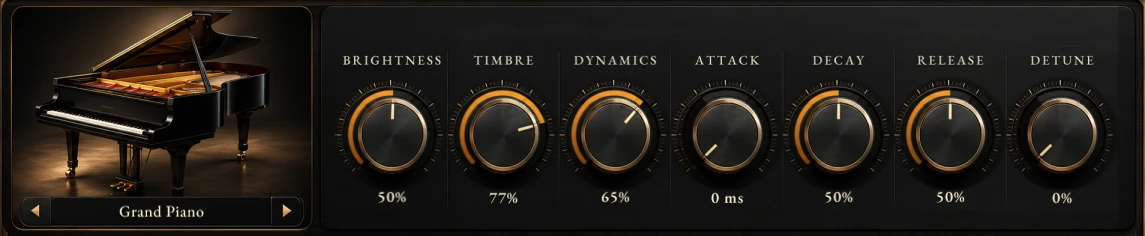
On the left, the piano with MODEL under it. On the right, the seven piano knobs.
The effects row

LOW and HIGH, DRIVE, COMP, CHORUS, ECHO with TIME, FEEDBACK and the echo’s style, REVERB with SIZE, PRE-DELAY and the reverb’s type, WIDTH, then VOLUME and the LIMITER switch. See The effects.
The keyboard

Click lower on a key to play it harder (its front edge is the loudest), higher to play it softer. Drag across the keys for a glissando. The keys light up for every note the piano plays, from the face, your keyboard or the song.
Knobs and buttons
| Do this | To |
|---|---|
| Drag a knob up or down | Change it. Hold Shift or Ctrl for fine steps. |
| Mouse wheel over a knob | Change it in small steps (TIME moves one note value a notch). |
| Double-click a knob | Send it home. |
| Right-click a knob | Reset it to the loaded preset’s own value, type a value (“-6 dB”, “1/8 D” or a number), copy or paste. |
| Click ◀ or ▶ on MODEL or a style box | Step through its choices, round and round. The mouse wheel steps too. |
| Click the name on MODEL or a style box | Choose from its list. |
| Click LIMITER | Switch it on or off. |
LOW, HIGH and VOLUME show dB; ATTACK and PRE-DELAY milliseconds; SIZE seconds; TIME a note value; the rest a percentage.
8.5.4 MODEL
| MODEL | What it is |
|---|---|
| Grand Piano | The recorded grand. |
| Cinematic Piano | The same grand felt-voiced: softer hammers, a gentle start, a longer release, and a room of its own that stays even with REVERB at 0. |
| Electric Piano | A classic suitcase electric piano, with a gentle autopan. |
- Every model plays at the same loudness, so you can switch without touching VOLUME.
- Switching between the Grand and the Cinematic keeps the notes that are sounding. Switching to or from the Electric lets them go.
The recorded grand, and when the built-in grand plays
The Grand and the Cinematic play the recorded grand, which Harmonic Pro Studio reads from its factory content when it starts. Until it has been read, or if it is missing or damaged, they play HPS Piano’s built-in grand instead: a lighter piano at the same loudness. Your song keeps playing either way.
To see which one plays, point at MODEL: the hint bar at the top of the main window says whether the Grand and the Cinematic play the recorded piano, whether it is still loading, or why it could not be read. If your disk was ever too slow for a note, it says how many times.
8.5.5 The piano knobs
With every knob at home, the recorded grand plays exactly as it was recorded.
| Knob | Home | What it does |
|---|---|---|
| BRIGHTNESS | 40 % | The tone. Up: brighter. Down: darker, as if the lid were closed. |
| TIMBRE | 50 % | The hammers’ hardness. Up: notes played harder, brighter and with more attack, at the same loudness. Down: softer and rounder. |
| DYNAMICS | 65 % | How much your playing moves the loudness. At 0 every note plays at the same level (the tone still follows your touch); at 100 % the range is about one and a half times the piano’s own. |
| ATTACK | 0 ms | A swell into each note, up to 2 s. At 0 the hammer strikes as recorded. |
| DECAY | 50 % | How long a held note rings. Below 50 % notes die away sooner (a little longer in the bass); at and above 50 % they ring as recorded. |
| RELEASE | 50 % | How long a note rings after you let its key go: shorter below 50 %, longer above. |
| DETUNE | 0 % | An old piano’s tuning: each key a little out, up to a quarter of a semitone. |
8.5.6 The effects
An effect at 0 is switched out. Every move glides smoothly, so you can turn knobs while the piano plays.
| Control | Range | What it does |
|---|---|---|
| LOW · HIGH | ±12 dB | Tone shelves below 120 Hz and above 4 kHz. Flat (0 dB) at 12 o’clock. |
| DRIVE | 0–100 % (home 35 %) | Tube warmth, then grit. Its level is matched for you, so turning it up adds colour, not loudness. |
| COMP | 0–100 % | A compressor on one knob: more COMP, more even playing. |
| CHORUS | 0–100 % | Width and a gentle movement. Lovely on the Electric. |
| ECHO | 0–100 % | How much of the echo you hear. 0 is off. |
| TIME | 12 note values | The echo on the song’s tempo: 1/16 T, 1/16, 1/8 T, 1/16 D, 1/8, 1/4 T, 1/8 D (home), 1/4, 1/2 T, 1/4 D, 1/2, 1/2 D. |
| FEEDBACK | 0–95 % (home 35 %) | How many repeats. |
| The echo’s style | 8 styles | CLEAN, MOD, TAPE (home), ANALOG, DUB, LO-FI, DIFFUSE, REVERSE. |
| REVERB | 0–100 % (home 40 %) | How much of the reverb you hear. The echoes go into it too. The Cinematic always keeps some of its room. |
| SIZE | 0.30–10 s (home 0.72 s) | How long the reverb rings. |
| PRE-DELAY | 0–200 ms (home 10 ms) | A short gap before the reverb, so the notes stay clear in front of it. |
| The reverb’s type | 7 spaces | ROOM (home), HALL, CATHEDRAL, PLATE, CHAMBER, CONCERT, SHIMMER (the hall with a shimmer an octave up). |
| WIDTH | 0–200 % (home 100 %) | From mono to extra wide. 100 % is the piano as played. The bass always stays in the centre. |
| VOLUME | OFF to +12 dB (home 0 dB) | The piano’s level after the effects. 0 dB at 12 o’clock. |
| LIMITER | On / off (home on) | Keeps the piano’s peaks under −1 dB with no delay, and changes nothing below −4 dB. |
8.5.7 Playing it
Your keyboard and velocity
HPS Piano plays the velocity your keyboard sends. On the Grand every one of the 16 recorded strengths is used, and the loudness rises smoothly from the softest note to the loudest. If your keyboard feels too hard or too soft, set its own velocity curve.
The pedals
| Pedal | What it does |
|---|---|
| Sustain (CC 64) | Holds the notes. On the Grand you hear the pedal itself go down and up, and the dampers when it lifts. Half pedalling works with a continuous pedal: part way down, the dampers only touch the strings and notes fade slowly instead of stopping. |
| Sostenuto (CC 66) | Holds only the notes you are holding when you press it. |
| Soft (CC 67) | Plays softer and rounder. |
The piano’s own sounds
On the Grand and the Cinematic, as on a real piano:
- The dampers: a key you let go is damped, quickly in the treble and more slowly in the bass. The top keys, from F6 up, have no dampers and ring on.
- Release sounds: the felt of the damper coming down, a little louder after a loud note.
- Key sounds: a soft click as each key comes up.
Other MIDI
- Volume (CC 7) lowers or raises the piano.
- All notes off and all sound off stop everything at once, echoes and reverb included.
- Reset all controllers lifts the pedals quietly.
8.5.8 Presets
The preset bar
- ◀ ▶ step through the presets: the factory sounds, then yours, round and round. From Default, ▶ is Concert Grand. Each step is one undo step.
- Click the name to open the preset browser. · Edited shows once you have moved a control.
The preset browser
| You do | What happens |
|---|---|
| Click a sound | You hear it at once. Nothing is kept until you say so. |
| Done, Enter or a double-click | Keeps it. One undo step. |
| Put back or Esc | Returns exactly the sound you had, edits and all. |
| DEFAULT | The piano’s own starting sound. |
| Search | Finds words in the names, groups, models and notes. |
| The star | Marks a favourite. |
| Right-click one of yours | Rename, move to another group, duplicate or delete it. A deleted preset goes to the Recycle Bin. Factory sounds can be duplicated, not changed. |
The factory sounds
Forty sounds, each at the same loudness as Default, so stepping through them never jumps.
| Group | Sound | What it is |
|---|---|---|
| Grand | Concert Grand | The Grand in a concert hall, a little HIGH, wider. |
| Grand | Studio Grand | Close and dry, a small room, a touch of COMP: sits in a mix. |
| Grand | Bright Grand | Brighter hammers and HIGH: cuts through a band. |
| Grand | Warm Grand | Darker, more body, a chamber. |
| Grand | Soft Grand | Softly voiced, a gentle touch, a warm room: for quiet songs. |
| Grand | Jazz Club Grand | A little dark, close, a small club. |
| Grand | Classical Hall | The full range of the touch, a long concert hall, PRE-DELAY. |
| Grand | Ballad Grand | A plate, a longer RELEASE, a little HIGH: pop ballads. |
| Cinematic | Felt Piano | The Cinematic as it is: felt hammers and its own room. |
| Cinematic | Felt Close | Felt, close and intimate, the room small. |
| Cinematic | Score Hall | Felt in a big hall, wide: film scores. |
| Cinematic | Dream Felt | Felt, a long plate and a soft diffuse echo. |
| Cinematic | Lullaby | Felt, darker and softer, a warm chamber. |
| Cinematic | Swell Felt | Each note swells in (ATTACK), a cathedral. |
| Cinematic | Nocturne | Felt, a touch out of tune, a long concert hall. |
| Electric | Suitcase | The Electric as it is, a small room. |
| Electric | Chorus Tines | The Electric through CHORUS, wider. |
| Electric | Soft Tines | Darker and gentle, a little room. |
| Electric | Bright Tines | Bright bell tines and COMP: 80s ballads. |
| Electric | Crunch Keys | The Electric driven and compressed: rock and funk. |
| Electric | Neo Soul Keys | Warm, a little CHORUS, a dotted echo: neo soul. |
| Electric | Ballad Tines | A long plate, a soft CHORUS, a longer RELEASE. |
| Pop & Rock | Pop Piano | Bright and compressed, a short plate, wider: modern pop. |
| Pop & Rock | Rock Piano | Bright, a little DRIVE, compressed: with guitars. |
| Pop & Rock | Stage Piano | Even and wide, a chamber: live sets. |
| Pop & Rock | House Stab | Short, bright, compressed chords, a plate: 90s house. |
| Pop & Rock | Power Ballad | Big, compressed, a wide hall. |
| Pop & Rock | Upright Rock | A smaller, plinkier piano, a little DRIVE: rock and roll. |
| Lo-fi & Vintage | Honky Tonk | Out of tune (DETUNE), bright, a saloon room. |
| Lo-fi & Vintage | Tape Piano | A tape echo, a little worn: dusty and warm. |
| Lo-fi & Vintage | Lo-fi Keys | The Electric, lo-fi: no highs, a crunchy echo. |
| Lo-fi & Vintage | Old Upright | A small old piano, a little out of tune, close. |
| Lo-fi & Vintage | Dusty Tines | The Electric, darker, a little CHORUS and a lo-fi echo. |
| Lo-fi & Vintage | Cassette Felt | Felt on a worn tape: soft, wobbly echo, no highs. |
| Ambient & FX | Shimmer Grand | The Grand into SHIMMER, wide. |
| Ambient & FX | Endless | A soft swell into a long cathedral. |
| Ambient & FX | Backwards | A REVERSE echo under each note, a hall. |
| Ambient & FX | Diffuse Keys | Felt into a DIFFUSE echo and a long plate. |
| Ambient & FX | Space Tines | The Electric, a DUB echo and a hall. |
| Ambient & FX | Swell Pad | Slow swells, SHIMMER, very wide: a pad from a piano. |
Your own presets
- Save preset as… (the gear) asks for a name and a group. A name has up to 32 characters and can’t be a factory sound’s name or “Default”. Saving over a preset of yours asks first.
- Save preset saves over your preset the sound came from.
- Reset to the default sound brings back Default, in one undo step.
- Your presets are kept in your User folder, under User › Plugins › Instruments › HPS Piano › Presets (Settings › Locations). Show my presets folder (the gear) opens it. Each is a small file you can copy to another computer.
8.5.9 In the song
Undo
Every knob turn is one undo step; so is each click on MODEL, a style box, the LIMITER or the power, and each preset you load. Hearing sounds in the browser adds nothing to undo until you click Done. Saving a preset is not an undo step.
Automation
HPS Piano’s own knobs can’t be automated yet. The track’s volume, pan and sends, and any effects you add after the piano, automate as on any track. The pedals and volume (CC 7) play from your MIDI clips.
Saving with the song
Your song saves each piano track’s sound, its power and the preset it came from, so the preset bar names it again when you reopen the song. A song made with an earlier version opens sounding as it did.
Playback and exports
- An export plays every note in full, even from a slow disk.
- With reverb, an export can come out a fraction of a dB louder than playback.
The Arranger band
The band’s PIANO plays the same piano: the recorded grand whenever it is ready. Its TONE knob turns BRIGHTNESS and its DRIVE knob turns DRIVE.
8.5.10 Working with Nimi
Ask Nimi to do anything you can do on the face. Some examples:
| You say | What happens |
|---|---|
| “Put HPS Piano on a new track called Keys.” | A new piano track, on Default. |
| “Make the piano darker.” / “Set the reverb to 25 %.” | BRIGHTNESS down / REVERB 25 %. |
| “Switch the piano to the Cinematic.” | MODEL Cinematic Piano. |
| “Give it a dotted eighth tape echo.” | ECHO up, TIME 1/8 D, the TAPE style. |
| “What is the piano playing right now?” | Nimi reads back the sound, the preset it came from and whether it is edited, and whether the recorded grand plays. |
| “List the Lo-fi & Vintage piano presets.” / “Load Neo Soul Keys.” | The group’s sounds / loads it, one undo step. |
| “Save this piano as My Ballad in Grand.” | Saves your preset, and asks first before replacing one of the same name. |
| “Star Concert Grand.” / “Rename My Ballad to Late Ballad.” | A favourite / renames your preset. |
| “Turn the piano off.” | The power. |
Every change Nimi makes is one step in the Edit menu’s undo, just like your own, and an open window follows it.
8.5.11 Tips and limits
Start from a factory sound close to what you want, then edit it, and keep yours with Save preset as….
Darker or brighter? BRIGHTNESS changes the tone; TIMBRE changes the touch. Try both.
For an even pad, lower DYNAMICS and raise ATTACK, then add SHIMMER.
Under a busy mix, a little COMP and LOW down do more than VOLUME.
- Memory: the recorded grand uses about 84 MB once, plus about 29 MB for each HPS Piano in the song (the band’s included).
- A slow disk: if a note’s sound arrives late from the disk, that note fades out quickly instead of clicking, and the hint at MODEL counts it. A faster disk fixes it.
- The built-in grand: the factory sounds are made for the recorded grand. On the built-in one, some can be up to about 2 dB off.
- Not yet: automation of the piano’s own knobs, and a velocity curve inside HPS Piano.
8.5.12 Troubleshooting
No sound. Check that the piano’s power is on, that VOLUME is not at OFF, and that the track is not muted. On your keyboard, check that the track is armed or monitoring.
The Grand sounds lighter than usual. Point at MODEL and read the hint bar. If the recorded piano is still loading, wait a moment. If it could not be read, check your factory content in Settings › Locations, or reinstall it.
A note faded out on its own. The disk was too slow for it. The hint at MODEL counts these. An export is never affected.
The sound is too loud or too quiet after a change. Use VOLUME. The LIMITER holds the peaks; leave it on.
The echo is off the beat. TIME follows the song’s tempo: check the tempo, or pick another note value.
Switching models cut my notes. Changing to or from the Electric lets the sounding notes go. Between the Grand and the Cinematic they keep ringing.
Didn’t find what you need? Contact us.